
Barret
Wednesday, December 3, 2025 | 7 minutes
My Current Toolset
Here’s a look at all the various tools I currently use for software development, speaking, and blogging.
Software Development
The tool I use for development depends on what I’m working on. I’m a big advocate of using the right tool for the right job and have no issues jumping back and forth between tools to even work on the same project or solution.
Visual Studio 2022/2026
For all my back end code and for working with Aspire solutions, I prefer the original and the best: Visual Studio. It just does C# code better than anything else. Sure, you can do C# in VS Code or Rider, but Visual Studio still does things better. Period. And VS2026 is the best one yet. It’s got a few minor bugs in the new version, but they’re quickly getting most of that resolved. And you can always use 2022 for anything, even the new .NET 10 projects.
Visual Studio Code
Or just Code, as everyone calls it. I use Code for working with front end or static web projects. This includes Blazor, HTML, CSS, Markdown, TypeScript, and JavaScript. This blog is created using Hugo static web apps, and I use Code to develop it. It does frontend like nothing else. When I’m working on full solutions, like an Aspire project, I’ll have both VS and Code open side by side.
I use a bunch of different extensions in Code, because you have to in order to do anything. But some of the more useful ones for me are Code Spell Checker, Playwrite Test, Github Actions, Copilot, markdownlint, and npm intellisense.
JetBrains Rider
If I have to develop on Mac or Linux, I’ll use Rider. It’s a great cross-platform tool for C# development, though it’s got some annoying quirks that I don’t like. Since VS doesn’t run on Mac or Linux and Rider does C# far better than Code, that’s what I’ll use there.
JetBrains DataGrip
For database development, no matter the database platform or development platform, I’ll use DataGrip. It is the hands down winner for database work, be it SQL Server, Postgres, or whatever you’re working in. And because it runs on Windows, Mac, or Linux, you get the same experience everywhere. I love it.
Postman
For testing endpoints, a Swagger page is ok, but Postman is far, far better. The ability to create and save projects, having variables where you can store data and pass it between requests, and so forth, make it a superior tool for testing API projects. How many times when you’re testing APIs have you had to copy and paste the information from one result into a different request. Postman makes automating all that easy. If you’re developing an API, you’ve got to use Postman. Period.
Docker Desktop
I use it with Aspire development projects, as one does. It’s a handy tool for spinning up disposable resources, especially dev databases in SQL Server or PostgreSQL. And you need Docker for Aspire anyway.
JetBrains Resharper
This is one of the few plugins I use with Visual Studio. It’s better than the default intellisense, and is extremely handy for refactoring especially.
GitKraken and Github
I don’t like the command line. Period. If I can do something in an app, I much prefer that. I just don’t want to have to learn and remember all the commands I need to type out. Having to do something on the command line is painful for me. So, for git needs, I tend to use GitKraken for anything I don’t do in Code or VS.
I used to store my repos in Azure DevOps, but I’ve moved more and more to Github. I would love to see either Github adopt the project management tools of DevOps, or DevOps adopt the code tools of Github, but I doubt that will happen. For now, the two sides of Microsoft seem content to stay in their lanes.
Content Creation
Code
Yes, a repeat. But it’s what I use for creating and maintaining this blog and my creative site. It does Hugo and Markdown well, and that’s just what I need.
Azure Static Web Apps
Both of my blogs are hosted on Azure Static Web Apps. It’s free for the base tier, lets you use pretty much any static web app platform, supports custom domains. It just works. And… it’s free. There is a file size limit, but so long as you optimize your images, you’ll be fine for any personal site.
Snagit
I use Snagit for all of my screenshots. It’s quick, easy, and after the initial cost, cheap to maintain the sub for annual upgrades. It just does everything I need, especially the capability to snag screenshots of scrolled web pages or other windows like terminal windows.
Gimp 3 and Paint.Net
I don’t tend to do a lot of image editing, but when I do need to, I stick with Gimp and Paint.NET. They’re fairly interchangeable and they’re both free to use for what I need them for.
StreamLabs Desktop
I don’t do live-streams… yet. But I do record videos for my YouTube channel. And StreamLabs makes it easy to record your desktop, jumping between screens and apps and cams as needed. It’s easy to setup, and the free version does everything I’ve needed it for so far. I do also occasionally use OBS, but 99% of the time now, it’s StreamLabs.
DaVinci Resolve
Once I’ve recorded my videos, I use DaVinci to edit them and export them in a format for YouTube. There’s a bit of a learning curve, but once you get used to it, it’s pretty easy to use. I used to use Camtasia for recording and editing, but I’ve since found the combo of StreamLabs and DaVinci to work much better for me.
PowerPoint
When I’m presenting, I use the old standard. It’s just better for slides and there are practically millions of templates out there, so you never run out of unique themes for your presentation. I generally don’t have a lot of slides, but for the ones I do make, it’s PowerPoint.
Elgato Stream Deck
The rest of the hardware is listed below, but I’ll put these here as they’re pretty much entirely for content creation use. I have 3 Elgato Stream Deck devices. A standard Stream Deck, a Stream Deck +, and a Pedal. These devices make it quick and easy to move between views in StreamLabs Desktop, mute and unmute, turn devices on and off, and all around manipulate things during a recording without having to jump between apps. If you do a lot of recording or streaming, these devices are invaluable.
Hardware
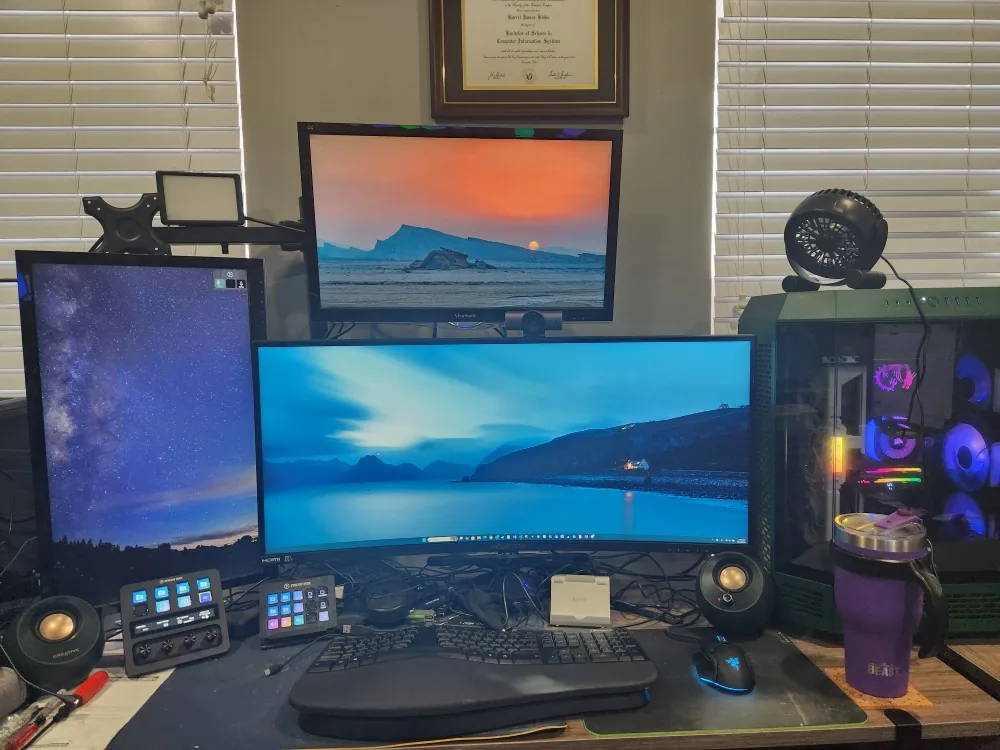
I posted a few months ago about my new desktop build. Given the absurd prices of memory now, I’m certainly glad I did it then. The 64GB of memory I bought for 200 bucks a few months ago is now 800. Insane.
As far as the other tools I use for recording videos, I have a Blue Yeti X microphone for audio and a Logi MX Brio camera for the video. I also use a couple of cheap USB key lights for illumination (when I remember to turn them on). And in the background of my videos you can see I have Govee Hex lights and a Govee LED display for some animations. Some day I might get around to doing more with those.
For my mobile operations, such as presenting at conferences, I have a top end Microsoft Surface Laptop Studio 2. It’s heavy, but it’s powerful and works like either a full laptop or a Surface tablet. I love it, and it’s nearly as powerful as my desktop.
For my main driver monitors, I prefer ultra-wides. On my personal desktop, that’s a Sceptre C35 flanked by two Viewsonic 22" 1080p’s, one in landscape above and the other in vertical to the left. For my work machine, I’ve got an LG 49" ultrawide. That thing is a monster almost as wide as the desk it sits on. But it works well.
For sound I’ve got Sony wireless headphones and Creative Pebble speakers. Just depends on my mood, and whether or not I want to share the sound with the rest of the house while I work.
For keyboard, I use a Microsoft Ergonomic. Sadly, it’s my last one and you can’t buy them anymore. Biggest mistake Microsoft ever made to discontinue these devices. And for my mouse I use a Razer Basilisk. I prefer wired mice. They just feel like they work better.
And last, but not least, for hydration: When I’m not drinking a Diet Pepsi, I’ve got a Greens Steel Beast tumbler. Keeps ice water cold FOREVER. Love it. Highly recommended.
Conclusion
So that’s pretty much all I use. I’m a fairly simple guy, and this is what works for me. Maybe it will work for you as well.
