
Barret
Thursday, April 2, 2026 | 10 minutes
FastEndpoints vs ASP.NET Minimal APIs in 2026
It’s 2026. The landscape for APIs has shifted. In the .NET arena, MVC controllers are legacy and no longer the go-to technology for handling your endpoints. With .NET Core, minimal APIs are the mainstream, but the FastEndpoints community project has developed a strong following as a viable alternative. You’re developing a new .NET API project. Which do you choose? The answer, as always is: it depends.
Both approaches work well for implementing enterprise grade API projects. They’re both build on strong foundations of SOLID principles. It largely comes down to a question of which foundation fits better into your team’s habits and style. Minimal APIs win on simplicity, with zero dependencies. FastEndpoints wins on structure, built-in validation, and implementing REPR design patterns at scale.
What Are They? A High-Level Overview
ASP.NET Minimal APIs
Introduced in .NET 6, minimal APIs are the defacto standard of APIs built into the .NET library. They require no extra packages or dependencies. At their simplest, they can be registered directly in your Program.cs file, or they can be deployed anywhere else. Minimal APIs also support dependency injection, filters, route groups, OpenAPI, and AOT out of the box.
In performance, minimal APIs vastly outperform classic MVC controllers in every aspect (see the performance section below for more details). They also register far fewer background services, adding to the memory footprint savings. They also boot from a cold start far faster than MVC controllers.
var builder = WebApplication.CreateBuilder(args);
var app = builder.Build();

app.MapPost("/users", async (CreateUserDto dto, IUserService svc, CancellationToken ct) =>
{
    var user = await svc.CreateAsync(dto, ct);
    return Results.Created($"/users/{user.Id}", user);
});

app.Run();
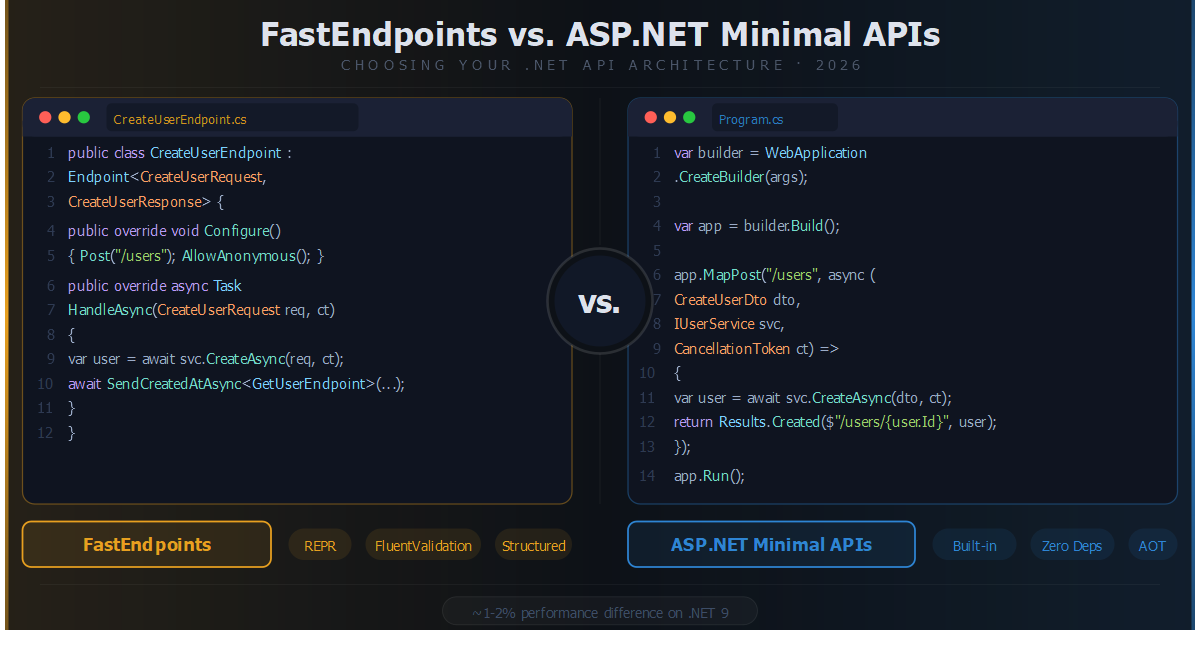
Here’s a simple example of a minimal API endpoint in our Program.cs file. It uses a simple lambda expression to define the functionality. If you create a new API project from the standard templates, you get a similar example of the weather endpoint.
FastEndpoints
FastEndpoints is an open source library built on top of ASP.NET’s minimal APIs. It follows the REPR (Request-Endpoint-Response) pattern. Each endpoint is defined in its own class and has a single responsibility, guiding you into a cleaner, more organized architecture. In its latest versions, FastEndpoints also supports native AOT compilation and provides a serializer context generator so you no longer need to manually define a JsonSerializerContext.
Performance-wise, FastEndpoints sees nearly the same gains as minimal APIs over MVC controllers, but with a slightly larger memory footprint due to the additional features it provides.
// Program.cs
builder.Services.AddFastEndpoints();
app.UseFastEndpoints();

// CreateUserEndpoint.cs
public class CreateUserEndpoint(IUserService svc) : Endpoint<CreateUserRequest, CreateUserResponse>
{
    public override void Configure()
    {
        Post("/users");
        AllowAnonymous();
    }

    public override async Task HandleAsync(CreateUserRequest req, CancellationToken ct)
    {
        var user = await svc.CreateAsync(req, ct);
        await SendCreatedAtAsync<GetUserEndpoint>(new { user.Id }, user, cancellation: ct);
    }
}
You can see from the sample that FastEndpoints has a somewhat different implementation than minimal APIs to accomplish the same goal.
Project Setup & Bootstrapping
Minimal APIs Setup
Minimal APIs require zero extra packages. It’s a part of the Microsoft.AspNetCore libary. If you only have a couple of simple endpoints, the Program.cs file is a natural place to define them, but it’s generally a good idea to move them off into their own files if it grows larger than that. As each of your minimal API endpoints needs to be registered with your app, this can easily get out of hand if you try to register them all in the Program.cs file. Thankfully, this is easily managed using extension methods.
Minimal APIs can be grouped using MapGroup:
var users = app.MapGroup("/users").RequireAuthorization();
users.MapGet("/",    GetUsersHandler.Handle);
users.MapGet("/{id}", GetUserByIdHandler.Handle);
users.MapPost("/",   CreateUserHandler.Handle);
This will define 3 endpoints under the users hierarchy.
FastEndpoints Setup
At the least, FastEndpoints requires adding one additional package: FastEndpoints. After that, you need to register the FastEndpoints service in your Program.cs file.
builder.Services
    .AddFastEndpoints()
    .AddSwaggerDoc(); // built-in OpenAPI support

app.UseFastEndpoints(c =>
{
    c.Endpoints.RoutePrefix = "api";
    c.Versioning.Prefix = "v";
});
app.UseSwaggerGen();
The implementation of FastEndpoints helps keep your Program.cs clean better than minimal APIs.
Endpoint Organization & Code Structure
Minimal API Endpoints
There is a common criticism that minimal APIs require that you define all the routes in Program.cs, thus adding to the clutter in the file. As I’ve mentioned, this isn’t accurate and can easily be alleviated with extension methods. Applying a clean architecture approach, you can create a separation of concerns. For example, you can add functionality for creating a route group:
// UserEndpoints.cs
public static class UserEndpoints
{
    public static RouteGroupBuilder MapUsers(this RouteGroupBuilder group)
    {
        group.MapGet("/",  async (IUserService svc) => await svc.GetAllAsync());
        group.MapPost("/", async (CreateUserDto dto, IUserService svc) =>
        {
            var user = await svc.CreateAsync(dto);
            return Results.Created($"/{user.Id}", user);
        });
        return group;
    }
}
FastEndpoints - One Class Per Endpoint (REPR)
In FastEndpoints, each endpoint is its own class, and in its own file. This makes it easy to navigate, locate, and modify any particular endpoint without affecting any of the other endpoints.
FastEndpoints has 4 basic types that your endpoints will be based off of.
Endpoint<TReq, TRes>Endpoint<TReq>EndpointWithoutRequest<TRes>EndpointWithoutRequest
TReq is a request object class, and TRes is a response object class. Each endpoint may or may not have a request and/or response, and you would use the appropriate Endpoint base class depending on that.
To achieve endpoint grouping for FastEndpoints, you would implement it as follows:
public class UsersGroup : Group
{
    public UsersGroup() =>
        Configure("users", ep => ep.Description(b => b.WithTags("Users")));
}

public class GetUserEndpoint : EndpointWithoutRequest<UserResponse>
{
    public override void Configure()
    {
        Get("/{id:guid}");
        Group<UsersGroup>();
    }
    // ...
}
A little different, but the result is the same.
As you can see, the small advantage of FastEndpoints is that it forces you to apply proper structure by convention. You can do the same with minimal APIs, but it isn’t something enforced in the same way.
Validation
Minimal API Validation
Minimal APIs does support data annotations on the request models, but that’s about the limit of validation without a lot of additional effort on your part to code. For example:
app.MapPost("/users", async ([FromBody] CreateUserDto dto, IValidator<CreateUserDto> validator) =>
{
    var result = await validator.ValidateAsync(dto);
    if (!result.IsValid)
        return Results.ValidationProblem(result.ToDictionary());
    // ...
});
FastEndpoints Validation
FastEndpoints doesn’t support data annotations, but it does support FluentValidation. This separates the validation logic from the data model, and it also provides more power and flexibility in writing your validation logic. But if you’re used to just doing it the old way, it does require a little different mode of thinking.
In FastEndpoints, validators are auto-discovered and wired up, and the validation runs before the HandleAsync function is even called, ensuring that proper validation of the request object always occurs. All you need to do is create a class based off of Validator<T>, where <T> is the request class to be validated. It doesn’t matter where you put those validator classes. They don’t even need to reference the Endpoint class in anyway, or vice-versa. FastEndpoints discovers them on startup and keeps track of them automagically for you.
public class CreateUserValidator : Validator<CreateUserRequest>
{
    public CreateUserValidator()
    {
        RuleFor(x => x.Email)
            .NotEmpty().WithMessage("Email is required")
            .EmailAddress().WithMessage("Invalid email format");

        RuleFor(x => x.Name)
            .NotEmpty()
            .MinimumLength(2);
    }
}
FastEndpoints makes your validation a lot more power and easier to implement.
Performance
Performance is a huge question for many. Minimal APIs are fast, leaving MVC controllers in the dust. FastEndpoints is built on top of minimal APIs, but adds a lot of additional features. It’s a no-brainer to move from MVC to either minimal APIs or FastEndpoints. But what does that all extra functionality that FastEndpoints provides above minimal APIs cost you, performance-wise?
About 1-2%. That’s it. A benchmark test in .NET 9 of FastEndpoints vs Minimal APIs vs MVC Controllers shows that the performance difference between the two is negligible. There will certainly be use-cases where you need that 1-2%. But for most of us, it’s an insignificant difference and performance should not generally be a reason to choose one over the other.
Auth, Middleware, & Logging
Minimal APIs Cross-Cutting Concerns
Minimal APIs implement middleware via app.Use or IEndpointFilter approaches. Auth is handled via .RequireAuthorization() on a group or route.
app.MapDelete("/users/{id}", DeleteUser)
   .RequireAuthorization("AdminOnly")
   .AddEndpointFilter<AuditLogFilter>();
FastEndpoints Cross-Cutting Concerns
FastEndpoints takes a little different approach to these tasks. It has the concept of pre/post processors that are applied either at the endpoint level or globally. It doesn’t make use of middleware for any of this. The pre/post processors handle logic for logging, security, and auditing without needing to interfere with business logic.
public class AuditPreProcessor<TRequest> : IGlobalPreProcessor
{
    public Task PreProcessAsync(IPreProcessorContext<TRequest> ctx, CancellationToken ct)
    {
        Console.WriteLine($"[AUDIT] {ctx.HttpContext.Request.Method} {ctx.HttpContext.Request.Path}");
        return Task.CompletedTask;
    }
}
One downside, however, of pre/post processors is that it makes testing more complicated for your endpoints. You have to take a very specific approach to how you implement your unit and functional tests for any endpoint that implements a pre or post processor. Consult the documentation on the FastEndpoints website for more details on the proper approaches to testing in these cases.
Documentation
Minimal API Documentation
Minimal APIs have full OpenAPI support starting in .NET 9 via the Microsoft.AspNetCore.OpenApi library. This can be implemented via attributes, the WithOpenApi() fluent extension, or XML documentation.
app.MapGet("/users/{id}", GetUser)
   .WithName("GetUser")
   .WithSummary("Fetch a user by ID")
   .Produces<UserResponse>(200)
   .Produces(404);
FastEndpoints Documentation
FastEndpoints has full built-in Swagger support via the AddSwaggerDoc or UseSwaggerGen extensions. Which you use depends on the version of FastEndpoints. You provide the documentation details in the Configure function of your endpoint via fluent syntax.
public override void Configure()
{
    Get("/users/{id:guid}");
    Description(b => b
        .WithName("GetUser")
        .Produces<UserResponse>(200)
        .ProducesProblem(404));
}
Testing
Minimal APIs Testing
There is full support for WebApplicationFactory<TProgram> out of the box with minimal APIs. Implementing strongly typed route/response testing requires a bit of manual setup however.
FastEndpoints Testing
FastEndpoints provides an additional library named FastEndpoints.Testing that includes AppFixture/TestBase abstractions to assist with setting up testing. If you’ve implemented pre/post processors, you will need to use that library and a specific approach to testing in order to effectively implement tests in those cases. However, aside from that, using WebApplicationFactory is also fully supported by FastEndpoints.
FastEndpoints Advanced Features
On top of all the other points, FastEndpoints has a few additional features that are worth consideration.
- Job Queues - It has built-in background job queues with distributed worker support
- Event Bus - There is a lightweight in-process publish/subscribe feature. Not for heavy duty usage, but if you don’t need something substantial, it’s an option
- CQRS - Full integration with MediatR
- API Versioning - you can easily version endpoints independently without route conflicts between co-existing old and new endpoint versions
- Typed Results/Union Returns - Full OpenAPI spec support for typed results
So Which Do I Choose?
That’s up to you and how your team works. There are advantages and disadvantages to either option.
| Criterion | Minimal APIs | FastEndpoints |
|---|---|---|
| Setup complexity | ✅ None (built-in) | 🟡 One NuGet package |
| Code organization | 🟡 Discipline-dependent | ✅ Enforced by convention |
| Built-in validation | ❌ Manual wiring | ✅ Auto FluentValidation |
| Data Annotations support | ✅ Yes | ❌ No |
| Performance (.NET 9+) | ✅ Neck-and-neck | ✅ Neck-and-neck |
| Native AOT | ✅ Yes | ✅ Yes (recent addition) |
| Built-in testing helpers | 🟡 WebAppFactory only | ✅ Typed TestBase |
| OpenAPI docs | ✅ Native (.NET 9) | ✅ Built-in fluent API |
| CQRS / job queues / events | ❌ DIY | ✅ Built-in |
| Learning curve | ✅ Very low | 🟡 Moderate |
| External dependency risk | ✅ None | ⚠️ Community-funded OSS |
⚠️ Important note for 2026: Due to low financial backing, FastEndpoints announced it may move to “Bugfix Only” mode. Teams adopting it for greenfield projects should monitor the project’s funding and maintenance status.
When to Choose Minimal APIs
- Small-to-medium services or microservices with few endpoints
- Zero external dependencies and tight alignment with the ASP.NET roadmap
- Teams comfortable writing their own conventions and validation plumbing
- Data Annotations are already part of your workflow
When to Choose FastEndpoints
- Larger APIs with many endpoints and multiple developers
- Built-in REPR structure, validation, and testing without assembling them yourself
- Adopting Vertical Slice Architecture — FastEndpoints is a natural fit
- Willing to trade Data Annotations for FluentValidation
In the end, both products are fully enterprise-grade tools. Despite the potential “bug-fix only” status for FastEndpoints, it’s a full-featured product that would be a good choice in many situations as it sits today. You can’t go wrong with either choice.
