
Wednesday, April 29, 2026 | 23 minutes
Testing in .NET with xUnit + NSubstitute + Shouldly
Pretty much every .NET developer has written unit tests that look something like this:
[TestMethod]
public void GetOrder_ReturnsOrder_WhenOrderExists()
{
    var mockRepo = new Mock<IOrderRepository>();
    mockRepo.Setup(r => r.GetByIdAsync(1)).ReturnsAsync(new Order { Id = 1 });
    var service = new OrderService(mockRepo.Object);

    var result = service.GetOrderAsync(1).Result;

    Assert.IsNotNull(result);
    Assert.AreEqual(1, result.Id);
}
It’s fine. It works. It passes. Yet something about it feels off. The Setup boilerplate to make it work. The Assert.AreEqual that, when it fails, tells you “Expected: 1, Actual: 0” and leaves you to figure out the rest of it.
Multiply that across hundreds, or thousands, of tests in a growing codebase, and the friction becomes very real. Tests that are annoying to write get written with lower quality. The cryptic failure messages get ignored. Over time, your test suite becomes something the team tolerates rather than trusts.
There’s a better stack, a better way to approach testing – and it’s been sitting in the .NET ecosystem the whole time.
xUnit, NSubstitute, and Shouldly form a trio that prioritizes developer experience without sacrificing quality of coverage. xUnit ditches the ceremony of older test frameworks in favor of constructor-based setup and first-class async/await support. NSubstitute replaces the Setup/Verify pattern noise with a natural, readable substitution syntax. And Shouldly writes the failure messages that you actually need – the ones that tell you what the object was, not just that it wasn’t what you expected.
In this post we’ll walk through how to use this stack together to make your .NET testing process more beneficial and how to apply it in a Clean Architecture .NET solution.
Why This Stack?
So why this stack? What makes it a great solution for .NET development testing? xUnit is the core of the testing system, providing the framework for the testing. It’s a high performance testing platform with automatic parallelization with a clean, extensible, convention-based syntax. NSubstitute is a .NET mocking library designed for simplicity and readability. Its focus is on making your unit tests easier to write and maintain. Shouldly is a fluent syntax assertion library for .NET that is designed for human-readable assertions and exceptional error messages in your tests. This improves developer productivity and reduces issues related to syntax related test failures.
Setting It Up
So, how do we get our testing library setup? First, let’s look at the solution and project structure. In a Clean Architecture solution, tests are typically set up to mirror the layers they cover. Here’s an example solution structure:
MyApp.sln
├── src/
│   ├── MyApp.Core/
│   ├── MyApp.Infrastructure/
│   └── MyApp.Web/
└── tests/
    ├── MyApp.UnitTests/
    │   ├── Core/
    │   │   └── Services/
    │   └── MyApp.UnitTests.csproj
    └── MyApp.IntegrationTests/
        └── MyApp.IntegrationTests.csproj
In our test projects, we’ll add the following NuGet packages:
- xunit
- xunit.runner.visualstudio
- NSubstitute
- Shouldly
- NSubstitute.Analyzers.CSharp (For .NET 8 and later)
Remember the internal structure of your test projects should mirror the structure of the code they are testing. A test for my OrderService in MyApp.Core should live at tests/MyApp.UnitTests/Core/Services/OrderServiceTests.cs.
Before we get into writing an actual test, let’s look at a basic test class setup patterns. For xUnit, setup occurs in the test class constructor with no attributes needed.
public class OrderServiceTests
{
    private readonly IOrderRepository _orderRepository;
    private readonly OrderService _sut;

    public OrderServiceTests()
    {
        _orderRepository = Substitute.For<IOrderRepository>();
        _sut = new OrderService(_orderRepository);
    }

    [Fact]
    public async Task GetOrderAsync_ReturnsOrder_WhenOrderExists()
    {
        // ...
    }
}
Remember that xUnit generates a new instance of the test class for each test, so it makes setup easier to handle. The constructor runs fresh for each test. There’s no overlap, no need for a [TestInitialize] or [Setup] function, and no shared state leaking between tests.
If we want to run parameterized tests, we use [Theory] to define it and [InlineData] to provide the data to pass in.
[Theory]
[InlineData(1, true)]
[InlineData(0, false)]
[InlineData(-1, false)]
public void IsValidOrderId_ReturnsExpected(int orderId, bool expected)
{
    var result = OrderValidator.IsValidId(orderId);

    result.ShouldBe(expected);
}
One note on [InlineData]. The data must be compile-time constant values such as bool, string, int, or float. You cannot use complex objects or custom classes. You can use arrays of constants if need be.
If you need setup which would be expensive in terms of compute, such as spinning up a database connection, you can make use of shared setup that will be used across multiple tests using the IClassFixture interface.
public class OrderRepositoryTests : IClassFixture<DatabaseFixture>
{
    private readonly DatabaseFixture _fixture;

    public OrderRepositoryTests(DatabaseFixture fixture)
    {
        _fixture = fixture;
    }

    [Fact]
    public async Task GetByIdAsync_ReturnsOrder_WhenExists()
    {
        // use _fixture.DbContext
    }
}

public class DatabaseFixture : IAsyncLifetime
{
    public AppDbContext DbContext { get; private set; } = default!;

    public async Task InitializeAsync()
    {
        // spin up in-memory db or Testcontainers instance
        DbContext = await TestDbContextFactory.CreateAsync();
    }

    public async Task DisposeAsync()
    {
        await DbContext.DisposeAsync();
    }
}
If you need to do any async setup or teardown per test, you can make use of IAsyncLifetime. This code is on a per-test basis and is not shared.
public class OrderServiceTests : IAsyncLifetime
{
    private readonly IOrderRepository _orderRepository;
    private readonly OrderService _sut;

    public OrderServiceTests()
    {
        _orderRepository = Substitute.For<IOrderRepository>();
        _sut = new OrderService(_orderRepository);
    }

    public async Task InitializeAsync()
    {
        // async setup — seed data, open connections, etc.
        await Task.CompletedTask;
    }

    public async Task DisposeAsync()
    {
        // async teardown
        await Task.CompletedTask;
    }

    [Fact]
    public async Task GetOrderAsync_ReturnsOrder_WhenOrderExists()
    {
        // ...
    }
}
Writing Your First Unit Test
Now let’s look at an example of a full unit test. Let’s say we have an OrderService class that depends on a repository and a logger:
// Core/Entities/Order.cs
public class Order
{
    public int Id { get; set; }
    public string CustomerName { get; set; } = string.Empty;
    public decimal Total { get; set; }
    public OrderStatus Status { get; set; }
}

public enum OrderStatus { Pending, Processing, Shipped, Cancelled }

// Core/Interfaces/IOrderRepository.cs
public interface IOrderRepository
{
    Task<Order?> GetByIdAsync(int id);
    Task<IEnumerable<Order>> GetAllAsync();
    Task AddAsync(Order order);
}

// Core/Services/OrderService.cs
public class OrderService(IOrderRepository repository, ILogger<OrderService> logger)
{
    public async Task<Result<Order>> GetOrderAsync(int id)
    {
        var order = await repository.GetByIdAsync(id);

        if (order is null)
        {
            logger.LogWarning("Order {Id} not found", id);
            return Result.NotFound();
        }

        return Result.Success(order);
    }

    public async Task<Result> PlaceOrderAsync(Order order)
    {
        Guard.Against.Null(order);
        Guard.Against.NegativeOrZero(order.Total);

        order.Status = OrderStatus.Processing;
        await repository.AddAsync(order);

        return Result.Success();
    }
}
For this service class, we might set up a basic unit test class as follows:
public class OrderServiceTests
{
    private readonly IOrderRepository _orderRepository;
    private readonly ILogger<OrderService> _logger;
    private readonly OrderService _sut;

    public OrderServiceTests()
    {
        _orderRepository = Substitute.For<IOrderRepository>();
        _logger = Substitute.For<ILogger<OrderService>>();
        _sut = new OrderService(_orderRepository, _logger);
    }

    // --- Returns() for happy path ---

    [Fact]
    public async Task GetOrderAsync_ReturnsOrder_WhenOrderExists()
    {
        // Arrange
        var expected = new Order { Id = 1, CustomerName = "Jane Smith", Total = 99.99m };
        _orderRepository.GetByIdAsync(1).Returns(expected);

        // Act
        var result = await _sut.GetOrderAsync(1);

        // Assert
        result.IsSuccess.ShouldBeTrue();
        result.Value.ShouldNotBeNull();
        result.Value.Id.ShouldBe(1);
        result.Value.CustomerName.ShouldBe("Jane Smith");
    }

    // --- Returning null to simulate not found ---

    [Fact]
    public async Task GetOrderAsync_ReturnsNotFound_WhenOrderDoesNotExist()
    {
        // Arrange
        _orderRepository.GetByIdAsync(Arg.Any<int>()).Returns((Order?)null);

        // Act
        var result = await _sut.GetOrderAsync(42);

        // Assert
        result.IsSuccess.ShouldBeFalse();
        result.Status.ShouldBe(ResultStatus.NotFound);
    }
}
Take note of the NSubstitute setup in the constructor where we create mocks for our repository and logger classes. These mocks act like those classes, providing us functionality without actually interacting with our database or logging system.
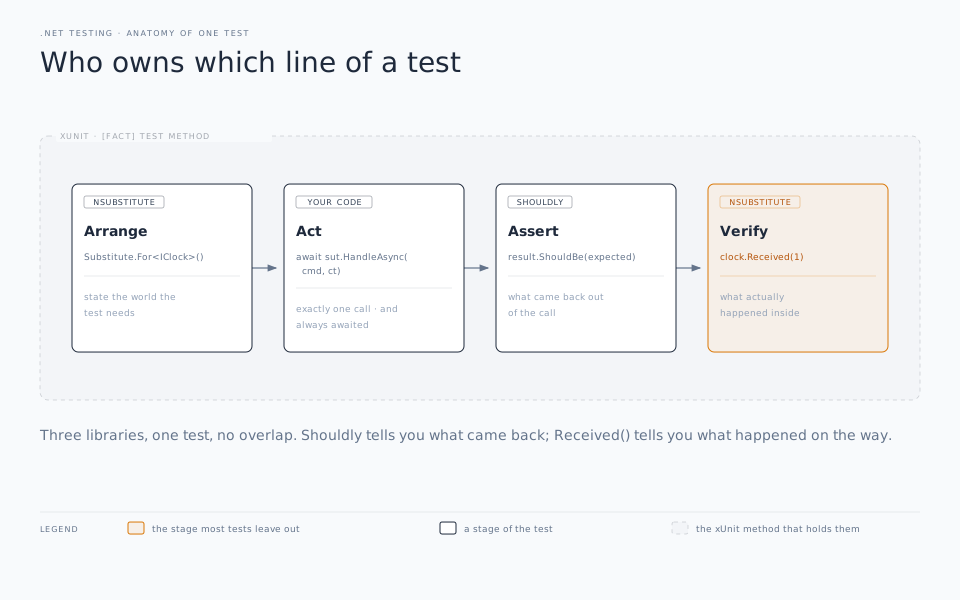
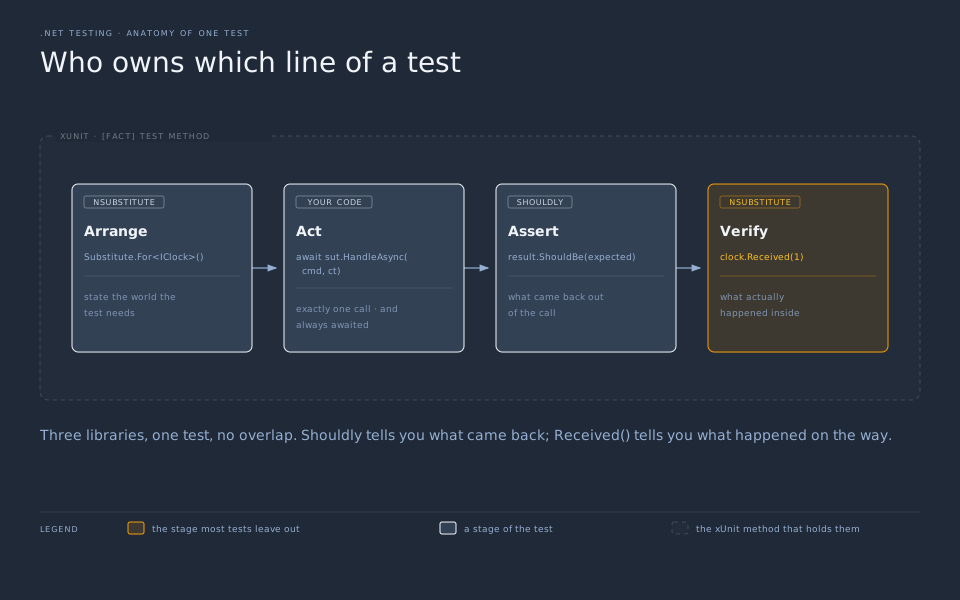
xUnit and NSubstitute follow the “Arrange, Act, Assert” pattern. In our tests we start with the “Arrange” section. This is where we define how our mocks should respond to certain calls. Only set up the responses we need for the test. There’s no need to do setup for anything that isn’t a part of the test. So, for our first test, GetOrderAsync_ReturnsOrder_WhenOrderExists, when we call our repository and pass in an ID of 1, we expect to get back the record we define as expected.
Next, is the “Act” section. Here we make a call to the instance of our service and get the result back.
The last section is the “Assert” section. This is where Shouldly comes into play. We write our assertions using Shouldly’s fluent syntax to verify the output from our service. Shouldly’s assertions are designed to read like sentences to be easy and quick to understand. And when they fail, the messages are clear and tell you exactly what went wrong.
So instead of:
Expected: 1
Actual:   0
You get a clearer message:
result.Value.Id
    should be
1
    but was
0
Let’s look at a side-by-side comparison of Moq + MSTest vs xUnit + NSubstitute + Shouldly:
// ❌ Moq + MSTest
[TestMethod]
public async Task GetOrderAsync_ReturnsOrder_WhenOrderExists_Moq()
{
    var mockRepo = new Mock<IOrderRepository>();
    var mockLogger = new Mock<ILogger<OrderService>>();
    mockRepo.Setup(r => r.GetByIdAsync(1))
            .ReturnsAsync(new Order { Id = 1, CustomerName = "Jane Smith" });

    var service = new OrderService(mockRepo.Object, mockLogger.Object);

    var result = await service.GetOrderAsync(1);

    Assert.IsTrue(result.IsSuccess);
    Assert.IsNotNull(result.Value);
    Assert.AreEqual(1, result.Value.Id);
    Assert.AreEqual("Jane Smith", result.Value.CustomerName);
}

// ✅ NSubstitute + xUnit + Shouldly
[Fact]
public async Task GetOrderAsync_ReturnsOrder_WhenOrderExists()
{
    // Arrange
    _orderRepository.GetByIdAsync(1)
                    .Returns(new Order { Id = 1, CustomerName = "Jane Smith" });

    // Act
    var result = await _sut.GetOrderAsync(1);

    // Assert
    result.IsSuccess.ShouldBeTrue();
    result.Value.ShouldNotBeNull();
    result.Value.Id.ShouldBe(1);
    result.Value.CustomerName.ShouldBe("Jane Smith");
}
The results are the same, but the setup and readability for xUnit stack is pretty clear. No .Object unwrapping, no Setup().ReturnsAsync() chain, no argument-order ambiguity from Assert.AreEqual(). It’s just “Arrange, Act, Assert”, written in readable, plain language.
Verifying Behavior (Not Just Results)
Another advantage of the stack is that you can verify behavior, not just output. In our example OrderService class, there is logging functionality. For instance, if order is null, it logs a warning. Our output returns a Result.NotFound(), but we have no way from the output of knowing that the logging message was actually sent.
NSubstitute provides us with the functions Received() and DidNotReceive() which verifies directly that our mock logging instance received (or did not receive) a call to LogWarning. We can write unit tests to cover this functionality very easily.
[Fact]
public async Task GetOrderAsync_LogsWarning_WhenOrderNotFound()
{
    // Arrange
    _orderRepository.GetByIdAsync(Arg.Any<int>()).Returns((Order?)null);

    // Act
    await _sut.GetOrderAsync(99);

    // Assert — did the logger get called?
    _logger.Received(1).LogWarning("Order {Id} not found", 99);
}

[Fact]
public async Task GetOrderAsync_DoesNotLogWarning_WhenOrderExists()
{
    // Arrange
    _orderRepository.GetByIdAsync(1).Returns(new Order { Id = 1 });

    // Act
    await _sut.GetOrderAsync(1);

    // Assert — logger should have been left alone
    _logger.DidNotReceive().LogWarning(Arg.Any<string>(), Arg.Any<object[]>());
}

[Fact]
public async Task PlaceOrderAsync_AddsOrder_WhenOrderIsValid()
{
    // Arrange
    var order = new Order { Id = 1, CustomerName = "Jane Smith", Total = 49.99m };

    // Act
    await _sut.PlaceOrderAsync(order);

    // Assert — repository.AddAsync should have been called exactly once
    await _orderRepository.Received(1).AddAsync(order);
}

[Fact]
public async Task PlaceOrderAsync_DoesNotAddOrder_WhenTotalIsZero()
{
    // Arrange
    var order = new Order { Id = 1, CustomerName = "Jane Smith", Total = 0m };

    // Act — expect a guard clause to throw
    await Should.ThrowAsync<ArgumentException>(
        async () => await _sut.PlaceOrderAsync(order));

    // Assert — repository should never have been touched
    await _orderRepository.DidNotReceive().AddAsync(Arg.Any<Order>());
}
Another feature of NSubstitute is Argument Matchers. We use these when we care that a call happened, but not the argument values. Recall in our earlier “Arrange” example that we defined the output when the ID passed in was a value of 1. If any other value was passed in during our “Act” section, it would return a null result, which might cause our service class to error out. NSubstitute allows us to use the Arg.Any<> syntax to have the code provide a valid result regardless of the parameter passed in.
// Arg.Any<T>() — match any value of that type
_orderRepository.GetByIdAsync(Arg.Any<int>()).Returns(new Order { Id = 1 });

// Arg.Is<T>() — match on a predicate
_orderRepository.GetByIdAsync(Arg.Is<int>(id => id > 0)).Returns(new Order { Id = 1 });

// Combining in verification
await _orderRepository.Received(1).AddAsync(
    Arg.Is<Order>(o => o.Status == OrderStatus.Processing));
The last line is especially significant. Rather than verifying the exact object reference, we are asserting that AddAsync was called with an order in Processing status. That makes our test a behavioral check, not just a reference check. It’s a crucial distinction.
The next available feature is checking call counts with the Received function.
[Fact]
public async Task GetAllOrdersAsync_FetchesFromRepository_ExactlyOnce()
{
    // Arrange
    _orderRepository.GetAllAsync().Returns(Enumerable.Empty<Order>());

    // Act
    await _sut.GetAllOrdersAsync();
    await _sut.GetAllOrdersAsync(); // called twice intentionally

    // Assert — verify exact call count
    await _orderRepository.Received(2).GetAllAsync();
}

[Fact]
public async Task CancelOrderAsync_UpdatesRepository_OnlyForMatchingOrder()
{
    // Arrange
    var orders = new List<Order>
    {
        new() { Id = 1, Status = OrderStatus.Pending },
        new() { Id = 2, Status = OrderStatus.Pending },
    };

    // Act
    await _sut.CancelOrderAsync(orderId: 1);

    // Assert — only order 1 should have been touched
    await _orderRepository.Received(1).UpdateAsync(
        Arg.Is<Order>(o => o.Id == 1 && o.Status == OrderStatus.Cancelled));

    await _orderRepository.DidNotReceive().UpdateAsync(
        Arg.Is<Order>(o => o.Id == 2));
}
This lets us verify behavior where the exact number of calls to a function are important.
Lastly, we have the ability to check what was passed to a substitute. For this we use Arg.Do<T>():
[Fact]
public async Task PlaceOrderAsync_SetsStatusToProcessing_BeforeAddingToRepository()
{
    // Arrange
    Order? capturedOrder = null;
    await _orderRepository.AddAsync(Arg.Do<Order>(o => capturedOrder = o));

    var order = new Order { Id = 1, CustomerName = "Jane Smith", Total = 49.99m };

    // Act
    await _sut.PlaceOrderAsync(order);

    // Assert — inspect what was passed to AddAsync
    capturedOrder.ShouldNotBeNull();
    capturedOrder!.Status.ShouldBe(OrderStatus.Processing);
}
This is great for testing that your service is correctly building objects such as DTOs correctly.
It can be tempting to verify anything and everything in our services, but that can lead to brittle tests that break whenever the implementation changes. A few good rules of thumb:
- Verify calls that are the point of the test - A
PlaceOrderAsynctest should verify thatAddAsyncwas called. - Verify side effects with observable consequences - Logging a warning when an order was not found is crucial behavior.
- Don’t verify every internal call - If functionality is covered by another test, such as if GetOrderAsync calls GetByIdAsync, then it isn’t necessary to duplicate that coverage.
- Don’t duplicate validation between NSubstitute and Shouldly - If
result.Value.Id.ShouldBe(1)passes, then it isn’t necessary to add aReceivedverification against theIOrderRepository.
Async Testing Patterns
xUnit has native support for async Task tests. There’s no need for wrappers, .Result blocking, or GetAwaiter hacks:
// ✅ Correct — xUnit handles the async context
[Fact]
public async Task GetOrderAsync_ReturnsOrder_WhenOrderExists()
{
    var order = new Order { Id = 1, CustomerName = "Jane Smith" };
    _orderRepository.GetByIdAsync(1).Returns(order);

    var result = await _sut.GetOrderAsync(1);

    result.IsSuccess.ShouldBeTrue();
}

// ❌ Never do this — blocks the thread and can deadlock
[Fact]
public void GetOrderAsync_ReturnsOrder_WhenOrderExists_Blocking()
{
    var result = _sut.GetOrderAsync(1).Result; // 💣
}
And NSubstitute handles async returns cleanly, without any additional setup. You just return the Task directly:
// Returns a completed task with a value
_orderRepository.GetByIdAsync(1).Returns(Task.FromResult<Order?>(new Order { Id = 1 }));

// Shorthand — NSubstitute unwraps this automatically
_orderRepository.GetByIdAsync(1).Returns(new Order { Id = 1 });

// Returning null (be explicit with the type)
_orderRepository.GetByIdAsync(Arg.Any<int>()).Returns((Order?)null);

// Simulating a sequence of return values
_orderRepository.GetByIdAsync(1)
    .Returns(
        _ => new Order { Id = 1, Status = OrderStatus.Pending },
        _ => new Order { Id = 1, Status = OrderStatus.Processing }
    );
You can also easily simulate infrastructure failures from your async calls:
[Fact]
public async Task GetOrderAsync_ThrowsException_WhenRepositoryFails()
{
    // Arrange
    _orderRepository.GetByIdAsync(Arg.Any<int>())
        .Returns<Order?>(_ => throw new InvalidOperationException("Database unavailable"));

    // Act & Assert
    await Should.ThrowAsync<InvalidOperationException>(
        async () => await _sut.GetOrderAsync(1));
}

[Fact]
public async Task GetOrderAsync_ThrowsTimeoutException_WhenRepositoryTimesOut()
{
    // Arrange
    _orderRepository.GetByIdAsync(Arg.Any<int>())
        .Returns<Order?>(_ => throw new TimeoutException("Query timed out"));

    // Act & Assert
    var ex = await Should.ThrowAsync<TimeoutException>(
        async () => await _sut.GetOrderAsync(1));

    ex.Message.ShouldContain("timed out");
}
Shouldly also cleanly handles async with its assertions:
// Assert an exception is thrown
await Should.ThrowAsync<ArgumentNullException>(
    async () => await _sut.PlaceOrderAsync(null!));

// Assert a specific exception message
var ex = await Should.ThrowAsync<ArgumentException>(
    async () => await _sut.PlaceOrderAsync(new Order { Total = -1m }));

ex.Message.ShouldContain("Total");

// Assert no exception is thrown
await Should.NotThrowAsync(
    async () => await _sut.PlaceOrderAsync(
        new Order { Id = 1, CustomerName = "Jane Smith", Total = 49.99m }));
If your service supports CancellationToken, the stack can easily verify that it’s being properly processed and not just swallowed up:
// Service method signature
public async Task<Result<Order>> GetOrderAsync(int id, CancellationToken cancellationToken = default)
{
    var order = await _repository.GetByIdAsync(id, cancellationToken);
    // ...
}

// Test
[Fact]
public async Task GetOrderAsync_PropagatesCancellationToken()
{
    // Arrange
    var cts = new CancellationTokenSource();
    var order = new Order { Id = 1 };
    _orderRepository.GetByIdAsync(1, cts.Token).Returns(order);

    // Act
    await _sut.GetOrderAsync(1, cts.Token);

    // Assert — token was passed through to the repository
    await _orderRepository.Received(1).GetByIdAsync(1, cts.Token);
}

[Fact]
public async Task GetOrderAsync_RespectsTaskCancellation()
{
    // Arrange
    var cts = new CancellationTokenSource();
    _orderRepository.GetByIdAsync(Arg.Any<int>(), Arg.Any<CancellationToken>())
        .Returns<Order?>(_ => throw new OperationCanceledException());

    // Act & Assert
    await Should.ThrowAsync<OperationCanceledException>(
        async () => await _sut.GetOrderAsync(1, cts.Token));
}
Lastly, the stack fully supports parallel and concurrent async flows that fan out multiple async calls, verifying that all branches executed correctly:
// Service that fetches multiple orders in parallel
public async Task<IEnumerable<Order>> GetOrdersByIdsAsync(IEnumerable<int> ids)
{
    var tasks = ids.Select(id => _repository.GetByIdAsync(id));
    var results = await Task.WhenAll(tasks);
    return results.Where(o => o is not null).Select(o => o!);
}

// Test
[Fact]
public async Task GetOrdersByIdsAsync_FetchesAllOrders_InParallel()
{
    // Arrange
    var ids = new[] { 1, 2, 3 };
    _orderRepository.GetByIdAsync(1).Returns(new Order { Id = 1 });
    _orderRepository.GetByIdAsync(2).Returns(new Order { Id = 2 });
    _orderRepository.GetByIdAsync(3).Returns(new Order { Id = 3 });

    // Act
    var results = await _sut.GetOrdersByIdsAsync(ids);

    // Assert
    results.Count().ShouldBe(3);
    await _orderRepository.Received(1).GetByIdAsync(1);
    await _orderRepository.Received(1).GetByIdAsync(2);
    await _orderRepository.Received(1).GetByIdAsync(3);
}
Organizing Tests at Scale
Let’s talk a bit about organization. An enterprise grade application with proper testing can easily run into thousands of tests (or more). It’s important that your tests be well organized. We touched briefly earlier on organizing your project structure, but there are other aspects to proper organization that are key.
First, it’s important that you properly name the tests so that when you look through test runner you quickly and easily understand the purpose of a test without having to go and look at the code. A good test name provides full context of the test. One common naming pattern is MethodName_Scenario_ExpectedResult. This makes it easy to read and understand, even at 4pm on a Friday afternoon.
// ✅ Clear, scannable, self-documenting
GetOrderAsync_ReturnsOrder_WhenOrderExists
GetOrderAsync_ReturnsNotFound_WhenOrderDoesNotExist
PlaceOrderAsync_SetsStatusToProcessing_BeforeAddingToRepository
PlaceOrderAsync_ThrowsArgumentException_WhenTotalIsNegative
CancelOrderAsync_DoesNotUpdateRepository_WhenOrderAlreadyCancelled

// ❌ Vague — tells you nothing when it fails
TestGetOrder
OrderTest1
ShouldWork
For parameterized tests, let the [InlineData] carry the context so the test name stays clear and readable:
[Theory]
[InlineData(0)]
[InlineData(-1)]
[InlineData(-999)]
public async Task PlaceOrderAsync_ThrowsArgumentException_WhenTotalIsNotPositive(decimal total)
{
    var order = new Order { Id = 1, CustomerName = "Jane Smith", Total = total };

    await Should.ThrowAsync<ArgumentException>(
        async () => await _sut.PlaceOrderAsync(order));
}
Test Data Builders
Next, let’s look at test data builders. Sometimes you need to set up data in the same way in a repeated fashion. You could replicate that block of code across all the tests that need it. But that quickly becomes unmanageable if the basic structure of that data changes in same way. For these situations, we can create builder helper classes. There are a couple of different patterns you might follow for these.
First, we have the Object Mother pattern:
// Tests/Helpers/OrderMother.cs
public static class OrderMother
{
    public static Order Default() => new()
    {
        Id = 1,
        CustomerName = "Jane Smith",
        Total = 49.99m,
        Status = OrderStatus.Pending
    };

    public static Order Cancelled() => Default() with
    {
        Status = OrderStatus.Cancelled
    };

    public static Order HighValue() => Default() with
    {
        Total = 10_000m
    };

    public static Order WithId(int id) => Default() with { Id = id };
}
Usage in tests is straightforward:
[Fact]
public async Task CancelOrderAsync_ReturnsError_WhenOrderAlreadyCancelled()
{
    var order = OrderMother.Cancelled();
    _orderRepository.GetByIdAsync(order.Id).Returns(order);

    var result = await _sut.CancelOrderAsync(order.Id);

    result.IsSuccess.ShouldBeFalse();
}
For more complex scenarios, the Builder pattern is more flexible:
// Tests/Helpers/OrderBuilder.cs
public class OrderBuilder
{
    private int _id = 1;
    private string _customerName = "Jane Smith";
    private decimal _total = 49.99m;
    private OrderStatus _status = OrderStatus.Pending;

    public OrderBuilder WithId(int id) { _id = id; return this; }
    public OrderBuilder WithCustomerName(string name) { _customerName = name; return this; }
    public OrderBuilder WithTotal(decimal total) { _total = total; return this; }
    public OrderBuilder WithStatus(OrderStatus status) { _status = status; return this; }

    public Order Build() => new()
    {
        Id = _id,
        CustomerName = _customerName,
        Total = _total,
        Status = _status
    };
}
This allows us to build our test data with more flexibility, using a fluent syntax:
// Usage
var order = new OrderBuilder()
    .WithId(42)
    .WithStatus(OrderStatus.Processing)
    .WithTotal(250m)
    .Build();
Nested Classes
If you have a lot of closely related tests across a complex class, you might choose to add nested sub-classes in your main test class. It can be a useful manner of grouping related tests:
public class OrderServiceTests
{
    // Shared setup
    private readonly IOrderRepository _orderRepository;
    private readonly ILogger<OrderService> _logger;
    private readonly OrderService _sut;

    public OrderServiceTests()
    {
        _orderRepository = Substitute.For<IOrderRepository>();
        _logger = Substitute.For<ILogger<OrderService>>();
        _sut = new OrderService(_orderRepository, _logger);
    }

    public class GetOrderAsync : OrderServiceTests
    {
        [Fact]
        public async Task ReturnsOrder_WhenOrderExists() { /* ... */ }

        [Fact]
        public async Task ReturnsNotFound_WhenOrderDoesNotExist() { /* ... */ }

        [Fact]
        public async Task LogsWarning_WhenOrderNotFound() { /* ... */ }
    }

    public class PlaceOrderAsync : OrderServiceTests
    {
        [Fact]
        public async Task SetsStatusToProcessing_BeforeAddingToRepository() { /* ... */ }

        [Fact]
        public async Task ThrowsArgumentException_WhenTotalIsNegative() { /* ... */ }
    }

    public class CancelOrderAsync : OrderServiceTests
    {
        [Fact]
        public async Task ReturnsError_WhenOrderAlreadyCancelled() { /* ... */ }

        [Fact]
        public async Task UpdatesStatus_WhenOrderIsPending() { /* ... */ }
    }
}
And it provides clean, clear output in test runner:
OrderServiceTests
  ├── GetOrderAsync
  │     ├── ReturnsOrder_WhenOrderExists ✅
  │     ├── ReturnsNotFound_WhenOrderDoesNotExist ✅
  │     └── LogsWarning_WhenOrderNotFound ✅
  ├── PlaceOrderAsync
  │     ├── SetsStatusToProcessing_BeforeAddingToRepository ✅
  │     └── ThrowsArgumentException_WhenTotalIsNegative ✅
  └── CancelOrderAsync
        ├── ReturnsError_WhenOrderAlreadyCancelled ✅
        └── UpdatesStatus_WhenOrderIsPending ✅
It can, however, lead to massive class files that might better be split across multiple files, so use with caution.
Shared Fixtures for Expensive Setup
When tests share a piece of expensive code setup, such as a database context, an HTTP client, or a container, you should make use of the IClassFixture to initialize it once per class, rather than once per test:
// Tests/Fixtures/SqliteFixture.cs
public class SqliteFixture : IAsyncLifetime
{
    public AppDbContext DbContext { get; private set; } = default!;

    public async Task InitializeAsync()
    {
        var options = new DbContextOptionsBuilder<AppDbContext>()
            .UseSqlite("DataSource=:memory:")
            .Options;

        DbContext = new AppDbContext(options);
        await DbContext.Database.EnsureCreatedAsync();
    }

    public async Task DisposeAsync()
    {
        await DbContext.DisposeAsync();
    }
}

// Tests/Infrastructure/OrderRepositoryTests.cs
public class OrderRepositoryTests : IClassFixture<SqliteFixture>
{
    private readonly AppDbContext _dbContext;
    private readonly OrderRepository _sut;

    public OrderRepositoryTests(SqliteFixture fixture)
    {
        _dbContext = fixture.DbContext;
        _sut = new OrderRepository(_dbContext);
    }

    [Fact]
    public async Task GetByIdAsync_ReturnsOrder_WhenExists()
    {
        var order = OrderMother.Default();
        _dbContext.Orders.Add(order);
        await _dbContext.SaveChangesAsync();

        var result = await _sut.GetByIdAsync(order.Id);

        result.ShouldNotBeNull();
        result!.Id.ShouldBe(order.Id);
    }
}
This is key for things like integration tests that need to call real databases or third party services as opposed to mocking those responses.
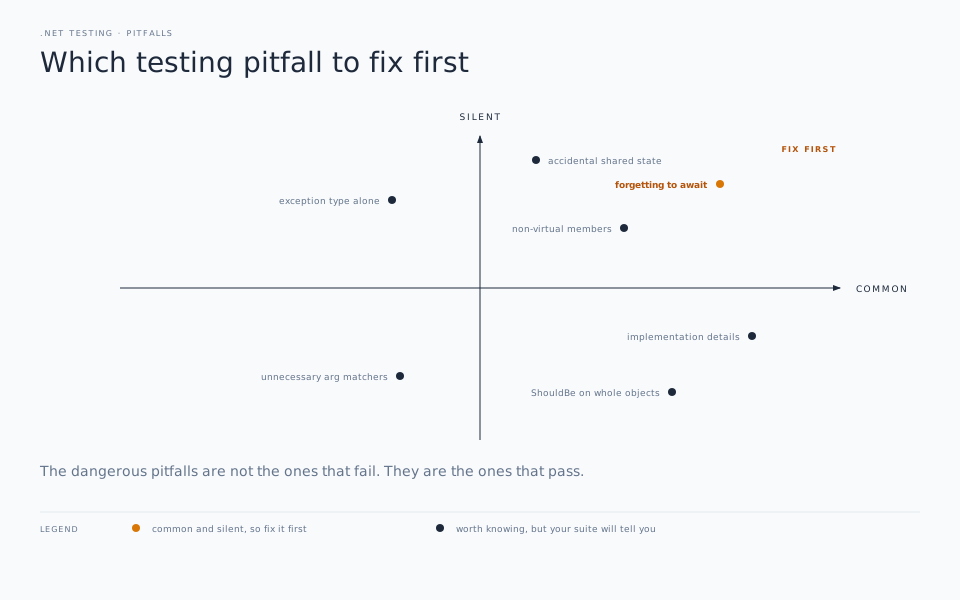
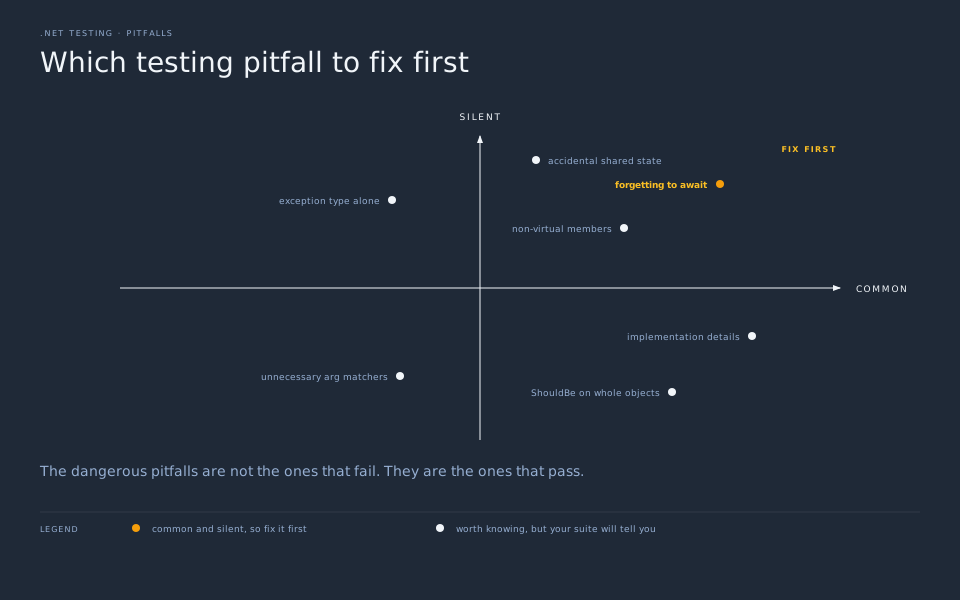
Common Pitfalls
There are some common pitfalls developers often run into when first getting started with this stack.
Substituting Non-Virtual Members
First, NSubstitute works by generating a proxy class at runtime. What that means is that it can only work with calls on interfaces or virtual and abstract members of a class. You can’t substitute for concrete classes or non-virtual methods.
// ❌ This will not work — GetByIdAsync is not virtual
public class OrderRepository
{
    public async Task<Order?> GetByIdAsync(int id) { /* ... */ }
}

var repo = Substitute.For<OrderRepository>(); // compiles...
repo.GetByIdAsync(1).Returns(new Order { Id = 1 }); // ...but won't intercept

// ✅ Always substitute interfaces in your application layer
public interface IOrderRepository
{
    Task<Order?> GetByIdAsync(int id);
}

var repo = Substitute.For<IOrderRepository>(); // works correctly
repo.GetByIdAsync(1).Returns(new Order { Id = 1 });
If you’re using the NSubstitute.Analyzers.CSharp package, it will catch most of these mistakes at build time. If you’re building with .NET 8 or newer, make sure you’re including that package from the start.
Forgetting to Await
The next common mistake is not awaiting a Received() call. Async substitutes need to be awaited, just like the calls themselves. If you don’t include the await, the assertion will silently pass and never happen, and your test results will not be valid. This can be a real difficult issue to track down because there will be no error and no compiler warning if you aren’t using the Analyzers package. Another reason to include that package from the start.
// ❌ Missing await — this assertion is never actually evaluated
_orderRepository.Received(1).AddAsync(Arg.Any<Order>());

// ✅ Always await async verifications
await _orderRepository.Received(1).AddAsync(Arg.Any<Order>());
Using ShouldBe() on Complex Objects
Another common mistake is that ShouldBe uses Equals under the hood. For reference type objects without value equality comparers, two objects with entirely identical properties are still not considered equal:
// ❌ Fails — different object references, no value equality
var expected = new Order { Id = 1, CustomerName = "Jane Smith", Total = 49.99m };
var actual = await _sut.GetOrderAsync(1);

actual.Value.ShouldBe(expected); // fails even if all properties match

// ✅ Use ShouldBeEquivalentTo() for deep property comparison
actual.Value.ShouldBeEquivalentTo(expected);

// ✅ Or assert individual properties when only some matter
actual.Value.Id.ShouldBe(1);
actual.Value.CustomerName.ShouldBe("Jane Smith");
For these objects, instead use ShouldBeEquivalentTo(). This function does a deep structural comparison, comparing all the properties to ensure the object is equal, even when it isn’t Equals. Use that when you need to compare the full object only. If you need to just compare the value of individual properties, do direct comparisons of just those needed objects instead of the whole thing.
Accidental Shared State
The next common mistake is creating shared state between tests when you don’t mean to. By default, xUnit creates new instances of the test class for each test. But if you create a shared static state, you can bypass this isolation entirely and cause state bleed between tests when you don’t intend to.
// ❌ Static state leaks between tests — order of execution matters
public class OrderServiceTests
{
    private static readonly IOrderRepository _repository =
        Substitute.For<IOrderRepository>();

    [Fact]
    public async Task TestA()
    {
        _repository.GetByIdAsync(1).Returns(new Order { Id = 1 });
        // ...
    }

    [Fact]
    public async Task TestB()
    {
        // _repository still has the setup from TestA — 💣
    }
}

// ✅ Instance fields, initialized in the constructor
public class OrderServiceTests
{
    private readonly IOrderRepository _repository;

    public OrderServiceTests()
    {
        _repository = Substitute.For<IOrderRepository>(); // fresh per test
    }
}
Unnecessary Argument Matchers
If you use Arg.Any<T>() on any of the parameters of a substitution, you have to use it for all of them.
// ❌ Throws an AmbiguousArgumentsException at runtime
_orderRepository.GetByIdAsync(1, Arg.Any<CancellationToken>());

// ✅ Use Arg.Is<T>() to match exact values alongside other matchers
_orderRepository.GetByIdAsync(Arg.Is<int>(id => id == 1), Arg.Any<CancellationToken>());
If you need to specify a specific value for some parameters, but not all, you need to use Arg.Is<T>() for the parameters you need to specify. You can’t use static values.
Implementation Details
Don’t over-test. Test only those pieces that are relevant to that specific test. And don’t test into the internals of the service that reach into other places. Ask yourself: If I refactored the internals of the service without changing the public contract, would I need to update this test? If the answer is yes, you’re testing the wrong thing.
// ❌ Brittle — verifies internal plumbing, not observable behavior
[Fact]
public async Task GetOrderAsync_CallsRepository()
{
    await _sut.GetOrderAsync(1);
    await _orderRepository.Received(1).GetByIdAsync(1); // so what?
}

// ✅ Resilient — verifies the outcome the caller actually cares about
[Fact]
public async Task GetOrderAsync_ReturnsOrder_WhenOrderExists()
{
    _orderRepository.GetByIdAsync(1).Returns(new Order { Id = 1 });

    var result = await _sut.GetOrderAsync(1);

    result.IsSuccess.ShouldBeTrue();
    result.Value!.Id.ShouldBe(1);
}
Asserting on Exception Type Alone
Well written exceptions carry meaningful context in their message and properties beyond the exception type itself. Make sure you validate the message, not just the exception.
// ❌ Passes for any ArgumentException — too permissive
await Should.ThrowAsync<ArgumentException>(
    async () => await _sut.PlaceOrderAsync(invalidOrder));

// ✅ Verify the exception carries meaningful context
var ex = await Should.ThrowAsync<ArgumentException>(
    async () => await _sut.PlaceOrderAsync(invalidOrder));

ex.Message.ShouldContain("Total");
ex.ParamName.ShouldBe("order");
Conclusion
Testing doesn’t have to feel like a chore. A lot of the friction developers associate with writing tests comes not from testing itself, but from the accumulated overhead of verbose frameworks — the boilerplate setup, the cryptic failure messages, the assertion methods where you can never remember which argument comes first.
xUnit, NSubstitute, and Shouldly each solve a specific part of that problem. xUnit gives you a clean, modern test structure with no ceremony. NSubstitute lets you express substitutes and verifications the way you’d describe them out loud. Shouldly writes the failure message you actually wanted in the first place. Together, they get out of your way and let you focus on the thing that actually matters: defining how your system should behave.
The patterns we’ve covered throughout this post — constructor-based setup, behavior verification over state inspection, Object Mother and Builder for test data, nested classes for organization — aren’t specific to this stack. They’re good testing habits that happen to shine brightest when the tooling supports them. This stack supports them.
If you’re starting a new .NET project, add these three packages before you write your first line of production code. If you’re working in an existing codebase still on MSTest or NUnit with Moq, you don’t need a big-bang migration — just reach for this stack in the next new test class you create and let it grow from there.