
Wednesday, June 17, 2026 | 4 minutes
The Case of the Empty IIS Deployment
Octopus Deploy reported a successful deployment. I browse to the website, and… nothing. A blank page. No errors in any of the obvious places.
Everything says it worked. GitHub created a package. The package was pushed to Octopus. Octopus ran the pipeline and says it successfully deployed to the IIS server. Everything in the pipeline shows green.
The Stack
It’s not all that unusual. IIS running on Windows Server on a VM in the cloud. The code is in a GitHub repo, with a fairly simple pipeline to generate the package and push it to Octopus Deploy, and a 1-step Octo pipeline to deploy it to the server.
The app itself is fairly straight-forward, a .NET Blazor web app with server and client (WASM) components to it. Nothing all that exceptional there.
The Red Herrings
I went through all the typical investigative steps. The IIS config was good, and the app pool and website were running. The Octopus Deploy logs showed everything succeeded. The publish profile looked good, and its configuration seemed good. File permissions seemed correct on the folder that Octo created and IIS was pointed at the folder and…. the folder was empty? Why was the folder empty when Octo said it deployed the package?
The Tell - Rolling My Investigation Check
That explained the empty website. IIS was serving a blank page because the folder was empty. Not a single file there to serve. But… the build succeeded, didn’t it?
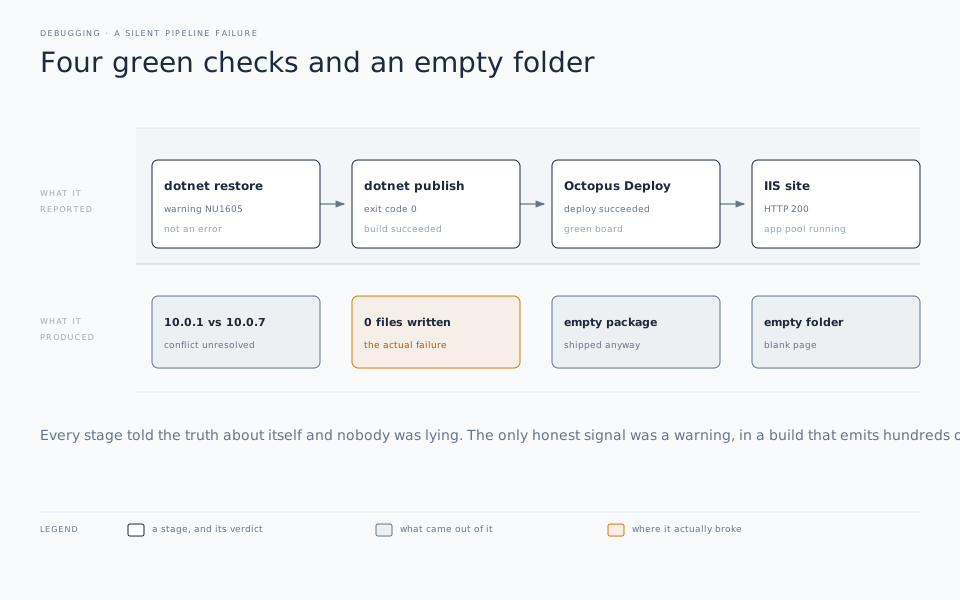
I had assumed that since GitHub had created a package and Octo had then “successfully” deployed that package, that therefore the issue wasn’t in the GitHub build and publish. But that wasn’t the case. The problem was in a matter of settings and the difference between warnings and errors in dotnet publish.
The Culprit
The true culprit was a version mismatch. You see, the project is a bit of a Frankenstein’s monster. In all there are 31 projects in the solution, including two complete Blazor applications (each with a server, a client, and a shared project), a legacy webforms app, and a host of other console apps, class libraries, and so forth.
The pipeline for this app was to build, publish, and deploy one of the Blazor applications. One of the Blazor applications was on version 10.0.7 for the Microsoft.AspNetCore.Components.WebAssembly.Server package, and the other was set at 10.0.1. And even though I was only trying to publish one of the projects, the restore and build of the full solution is required, and therein lies the problem.
When this is the case and you do a dotnet publish command, the package restore step will generate an NU1605 downgrade/version conflict message. But the problem is this comes out as a warning, not an error. The version mismatch prevents the publish from actually generating the output. But because it is not an error, the publish does not fail.
The result: GitHub happily generates an empty package file, and a “successful” result.
What’s even more frustrating about this is that a build and publish locally in Visual Studio works just fine. It even generates all the expected output. So nothing locally gives a clue unless you’re paying close attention to the warnings. And with this project, there are many, many, many warnings.
The Fix
The fix was simple. Update all the projects to use the same package version. Migrating to centralized project management would be the best solution, but with 30+ projects to go through, it was beyond the scope of the needed quick fix. I went through both Blazor projects and updated the references to 10.0.8 (the current latest), and the warning goes away. If the solution itself was in better shape, I would even have turned on TreatWarningsAsErrors. Unfortunately, being the monster that it is, that’s not a practical approach unless I wanted to spend the next 6-9 months trying to get a successful build by fixing warnings.
As a shorter term solution, I will probably at least turn on TreatWarningsAsErrors for that specific NU1605 error, so at least I avoid this issue again in the future.
Another piece of the fix will be to add a “smoke check” step to Octopus Deploy to verify the package artifact actually contains content before Octo ever ships it instead of relying on a “green” board from GitHub.
The Moral
Remember this: A green pipeline is not immunity. It’s just a roll of the dice. Just because everything says it’s all good, that isn’t always the case. Trust, but verify.