
Tuesday, August 25, 2026 | 14 minutes
Your PC Is a Build Agent: Self-Hosted GitHub Actions in Docker Desktop
This site used to build on GitHub-hosted runners. Every single run started from nothing: install Hugo, install Go, install Node, restore the npm cache, restore the Hugo Module cache, and then start doing the actual work of turning markdown into HTML. A build that does about forty seconds of useful work was spending two and a half minutes of ramp-up prep.
Meanwhile there’s a perfectly good computer sitting eighteen inches from me running Docker Desktop, doing nothing at 2 AM except waiting for me to open Visual Studio.
So I moved my CI pipeline onto it. The runner is a container. Its toolchain is baked into the image. Its caches live in named volumes that survive between runs. And the workflow that used to be forty lines of setup steps is now npm ci, hugo, pagefind, deploy.
In this post I’ll cover how you can build one yourself. And after that, I’ll go over everything that went wrong when I did. And it did go wrong.
The moving parts
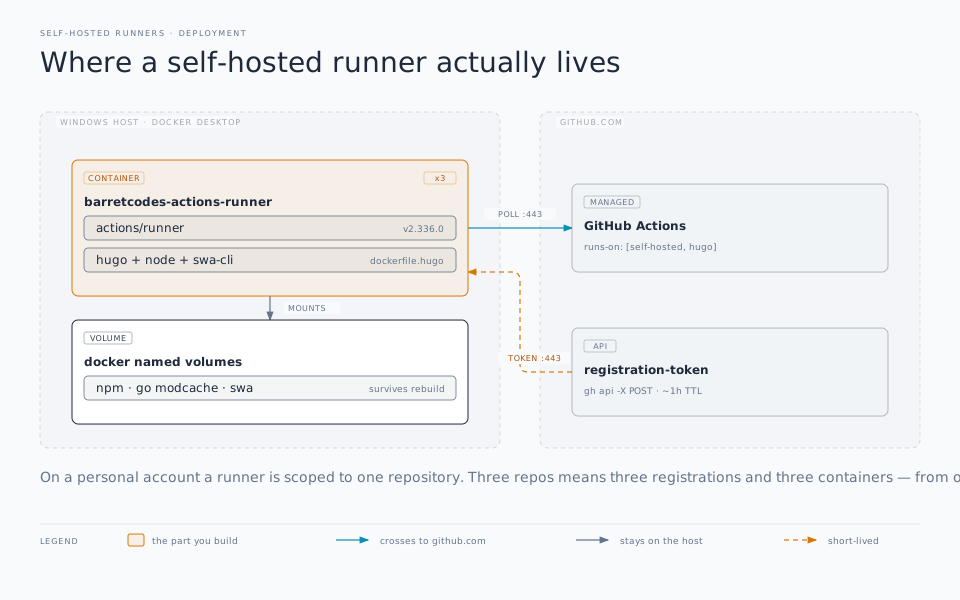
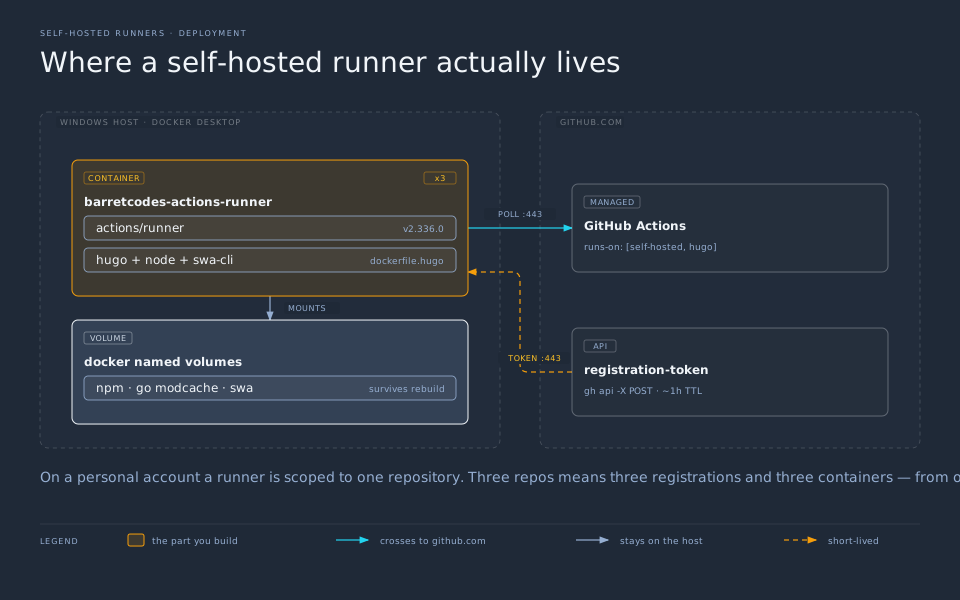
A self-hosted runner is less magical than it sounds. It’s three things:
- A binary you download from the
actions/runnerreleases page. - A registration token that ties that binary to a repository. You get it from the GitHub API, and it’s short-lived.
- A long-running process (
run.sh) that long-polls GitHub asking “got any jobs for me?”
That’s the whole architecture. Everything below is about wrapping those three things in a container so they survive reboots, image rebuilds, and your own forgetfulness. Uh… what was I saying?
One constraint shapes the rest of the design, so learn it now: on a personal account, self-hosted runners are scoped to a single repository. Organizations get org-level and enterprise-level runners that any repo can borrow. Personal accounts do not. If you have three repos, you need three registrations, each with its own registration token. However, as you’ll see, that doesn’t necessarily mean three images in your Docker Desktop.
The Dockerfile
Start from whatever base image matches the toolchain your builds actually need. If you’re not sure, that’s something your friend Codex or Claude can easily figure out for you. For this blog that’s Node, plus Hugo extended and Go bolted on:
FROM node:22.14.0-bookworm

ARG RUNNER_VERSION
ARG TARGETARCH
ARG HUGO_VERSION=0.146.0
ARG GO_VERSION=1.23.4

RUN apt-get update \
    && apt-get install -y --no-install-recommends \
       ca-certificates curl git jq \
    && rm -rf /var/lib/apt/lists/*

# Go: hugo.yaml pulls the toha theme as a Hugo Module, which shells out to go.
# Hugo extended: the theme's SCSS pipeline does not build on the vanilla binary.
RUN case "${TARGETARCH}" in \
      amd64) GO_ARCH=amd64; HUGO_ARCH=amd64; RUNNER_ARCH=x64 ;; \
      arm64) GO_ARCH=arm64; HUGO_ARCH=arm64; RUNNER_ARCH=arm64 ;; \
      *) echo "Unsupported architecture: ${TARGETARCH}" && exit 1 ;; \
    esac \
    && curl -fsSL "https://go.dev/dl/go${GO_VERSION}.linux-${GO_ARCH}.tar.gz" \
       | tar -C /usr/local -xz \
    && curl -fsSL \
       "https://github.com/gohugoio/hugo/releases/download/v${HUGO_VERSION}/hugo_extended_${HUGO_VERSION}_linux-${HUGO_ARCH}.tar.gz" \
       | tar -C /usr/local/bin -xz hugo \
    && mkdir /actions-runner \
    && cd /actions-runner \
    && curl -fsSL \
       "https://github.com/actions/runner/releases/download/v${RUNNER_VERSION}/actions-runner-linux-${RUNNER_ARCH}-${RUNNER_VERSION}.tar.gz" \
       -o runner.tar.gz \
    && tar xzf runner.tar.gz \
    && rm runner.tar.gz \
    && ./bin/installdependencies.sh

ENV PATH="/usr/local/go/bin:${PATH}"

COPY entrypoint.sh /entrypoint.sh
RUN sed -i 's/\r$//' /entrypoint.sh \
    && chmod +x /entrypoint.sh

WORKDIR /actions-runner

ENV RUNNER_ALLOW_RUNASROOT=1
ENTRYPOINT ["/entrypoint.sh"]
Four details in there are load-bearing:
TARGETARCH and the case block. Docker sets TARGETARCH to amd64 or arm64, but Go, Hugo, and the GitHub runner each name architectures differently. The runner wants x64 where everyone else says amd64. Translating once at the top means the same Dockerfile builds on an Intel desktop and an Apple Silicon laptop. It’s an important thing to remember for portability if needed.
installdependencies.sh. This ships inside the runner tarball and installs the native libraries the .NET-based runner host needs. Skip it and the container starts, registers, and then dies the first time it tries to actually run a job. Ask me how I know.
RUNNER_ALLOW_RUNASROOT=1. The runner refuses to start as root without it. In a container whose entire job is being disposable, root is fine; the flag just makes the runner stop arguing.
sed -i 's/\r$//'. If you build this image on Windows, Git may have handed you entrypoint.sh with CRLF line endings, and Linux will report the world’s least helpful error. It will spew something about /usr/bin/env: 'bash\r': No such file or directory. This one I couldn’t figure out for a bit, and needed some help from Claude to track down. Apparently, it’s a fairly common bug if you’re running on Windows. Stripping the carriage returns during build means it doesn’t matter how the file landed on disk. You can also fix this with .gitattributes.
The entrypoint
The container needs to register itself the first time it starts and not register itself every time after that. That’s the whole script:
#!/usr/bin/env bash
set -euo pipefail

if [[ ! -f .runner ]]; then
  : "${GITHUB_URL:?GITHUB_URL is required}"
  : "${RUNNER_TOKEN:?RUNNER_TOKEN is required}"

  ./config.sh \
    --unattended \
    --url "${GITHUB_URL}" \
    --token "${RUNNER_TOKEN}" \
    --name "${RUNNER_NAME:-docker-desktop-runner}" \
    --labels "${RUNNER_LABELS:-hugo,docker}" \
    --work "_work" \
    --replace
fi

exec ./run.sh
config.sh writes a .runner file containing the registration. If that file exists, we skip straight to run.sh. Put /actions-runner on a named volume (next section) and the registration outlives container restarts, image rebuilds, and the expiry of the token that created it. You supply a token exactly once, ever.
The exec matters: it replaces the shell with run.sh as PID 1, so docker stop delivers SIGTERM to the runner itself and it gets to shut down cleanly instead of being shot.
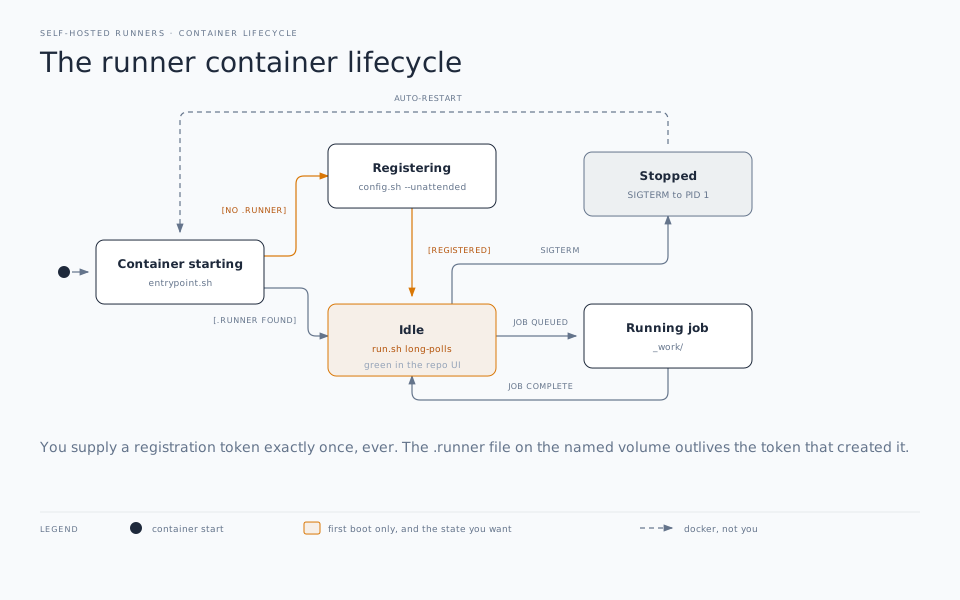
.runner file on the volume is what makes registration a one-time event.compose.yaml
services:
  barretcodes-runner:
    build:
      context: .
      dockerfile: dockerfile.hugo
      args:
        RUNNER_VERSION: "2.336.0"
    container_name: barretcodes-actions-runner
    restart: unless-stopped

    environment:
      GITHUB_URL: "https://github.com/barretb/barretcodes"
      RUNNER_TOKEN: "${BARRETCODES_RUNNER_TOKEN:-}"
      RUNNER_NAME: "barretcodes-docker-desktop"
      RUNNER_LABELS: "barretcodes,hugo"

    volumes:
      - barretcodes-runner-data:/actions-runner
      # Persist the caches that would otherwise re-download every run: npm
      # packages, the Hugo Module (Go) cache, and the StaticSitesClient binary
      # the SWA CLI fetches on first deploy.
      - barretcodes-npm-cache:/root/.npm
      - barretcodes-go-modcache:/root/go/pkg/mod
      - barretcodes-swa-cache:/root/.swa

volumes:
  barretcodes-runner-data:
  barretcodes-npm-cache:
  barretcodes-go-modcache:
  barretcodes-swa-cache:
restart: unless-stopped is what turns this from a toy into infrastructure. Docker Desktop starts with Windows, Docker starts the container, and the runner is online before you’ve finished logging in.
The ${BARRETCODES_RUNNER_TOKEN:-} default is deliberate: after first registration there’s no token in your environment, and without the :- fallback compose would refuse to start.
The cache volumes are where the real speed comes from. actions/cache on a hosted runner has to upload and download your cache over the network every run. A named volume is just a directory on an SSD that’s already there. Different league.
Because personal-account runners are per-repo, I run one container per repository. I’ve migrated three of my repos to self-hosted runners now. This one is Hugo, but the other two are .NET and share a single Dockerfile, differing only in build args and environment. One image, two registrations, two containers.
Starting it
The only genuinely awkward step. Registration tokens live about an hour, so don’t paste one into a file. You fetch it inline with the GitHub CLI:
$env:BARRETCODES_RUNNER_TOKEN = (gh api -X POST repos/barretb/barretcodes/actions/runners/registration-token --jq .token)
docker compose up -d --build barretcodes-runner
Then check Settings => Actions => Runners on the repo. You want a green “Idle”. If it says “Offline”, docker compose logs -f barretcodes-runner will tell you why, and it’s usually installdependencies.sh or line endings.
Pointing a workflow at it
Let’s first look at what the jobs section of my workflow YAML was before the migration:
jobs:
  build_and_deploy_job:
    if: github.event_name != 'pull_request' || github.event.action != 'closed'
    runs-on: ubuntu-latest
    name: Initialize job
    steps:
      - uses: actions/checkout@v4
        with:
          submodules: true
          fetch-depth: 0

  ### Using alt build process
      - name: Setup Hugo
        uses: peaceiris/actions-hugo@v3
        with:
          hugo-version: 'latest'
          extended: true

      - name: Cache Hugo modules
        uses: actions/cache@v4
        with:
          path: public
          key: ${{ runner.os }}-hugo-${{ hashFiles('**/go.sum') }}
          restore-keys: |
            ${{ runner.os }}-hugo-

      - uses: actions/setup-node@v4
        with:
          node-version: '20'
          cache: 'npm'
          # The action defaults to search for the dependency file (package-lock.json,
          # npm-shrinkwrap.json or yarn.lock) in the repository root, and uses its
          # hash as a part of the cache key.
          # https://github.com/actions/setup-node/blob/main/docs/advanced-usage.md#caching-packages-data
          cache-dependency-path: '**/package-lock.json'
      - run: npm ci

      - name: Build site with Hugo
        run: hugo --minify --cleanDestinationDir

      - name: Index site with Pagefind
        run: npx pagefind --site public
Swap runs-on for your labels. All of them must match exactly or builds will never trigger. The whole jobs section simplifies down to the following:
jobs:
  build_and_deploy_job:
    runs-on: [self-hosted, Linux, X64, barretcodes]
    timeout-minutes: 20
    steps:
      - uses: actions/checkout@v4
        with:
          submodules: true
          fetch-depth: 0

      - run: npm ci

      - name: Build site with Hugo
        run: hugo --minify --cleanDestinationDir

      - name: Index site with Pagefind
        run: npx pagefind --site public
self-hosted, Linux, and X64 are applied automatically by the runner; barretcodes is my label to tie the runner and repo together. Also be sure to set a timeout-minutes value. A hosted runner has a hard ceiling. Your hosted runner doesn’t, and a stuck job will happily sit on your only runner forever and a day if you let it.
I deleted the setup-hugo, setup-node, setup-go, and actions/cache steps, because the toolchain is in the image and the caches are in volumes. So all those steps are gone. I also removed several cleanup sections. All told, my workflow lost about forty lines.
What actually bit me
That’s the tutorial. It’s all pretty straightforward. Now let’s look at the things that caused me problems. I already mentioned the CRLF line endings on Windows issue. So what else bit me in the rear?
Container actions don’t work inside a containerized runner
This one cost me a couple hours to figure out. The site deploys to Azure Static Web Apps, and the official step is Azure/static-web-apps-deploy@v1. On the self-hosted runner it succeeded. There was a green check, with no errors. And what it deployed… was an empty site.
Azure/static-web-apps-deploy is a Docker container action. To run it, the runner starts a second container and bind-mounts the workspace into it using the workspace’s path on the host. When the runner is itself a container, that path exists inside the runner’s filesystem, not the host’s. Docker dutifully mounts a path that doesn’t exist, which it helpfully creates as an empty directory, and the action uploads exactly what it finds: nothing.
The fix is to stop using a container action. The SWA CLI is plain Node and does the same upload. Once again Claude helped me come up with the proper command to call:
      - name: Deploy
        env:
          SWA_CLI_DEPLOYMENT_TOKEN: ${{ secrets.AZURE_STATIC_WEB_APPS_API_TOKEN }}
        run: npx --yes @azure/static-web-apps-cli@2.0.10 deploy ./public --env production --no-use-keychain
The general rule: JavaScript actions and composite actions are fine in a containerized runner; Docker container actions are a trap. If an action’s action.yml says using: docker, find another way or run the runner directly on the host instead of in a container.
Scheduled jobs queue silently when the machine is off
My workflow has a schedule: trigger, because future-dated posts need a build to actually publish them. On a hosted runner, “scheduled” means “it happens.” On a self-hosted runner it means “it happens if somebody is listening.”
Turn the PC off, and the cron still fires on time. GitHub queues the job and waits for a matching runner to appear. If none does within roughly 24 hours, the job expires. No email, no red X, just a post that quietly didn’t publish.
If your builds are load-bearing on a schedule, either keep the machine on or accept the tradeoff explicitly. I chose to accept it and write it down in the README, which is a perfectly respectable engineering decision as long as you actually write it down.
Also, remember that’s not enough for the machine to be running. Docker Desktop must also be running, and the container must be running in Docker. A small thing, but important.
Version drift between the image and the repo
Local builds use the versions pinned in mise.toml. CI uses the versions baked into the image via ARG. Nothing enforces that those agree.
Bump hugo-extended locally, forget the Dockerfile, and you get the worst kind of bug: works on my machine, but fails in CI. Or, even worse, it passes in both and produces subtly different output. That’s one of the biggest downfalls to Hugo. Version changes often break things. And while it may look fine on your local test, if the CI version doesn’t match, the output that gets deployed may not be entirely correct. Hosted runners have the same problem, but setup-hugo at least reads its version from somewhere near your repo.
I’ve handled it with comments in both files pointing at each other. Not elegant. A build step that reads mise.toml and asserts against hugo version would be better, and is on the list for a future enhancement at some point when I get around to it.
PR preview deploys ate the staging environments
Not runner-specific, but it surfaced during the same migration. Every pull request deploy created a Static Web Apps staging environment, and those environments are only released when the PR is closed. And even then, it didn’t always clean up after itself. And if you have something like Dependabot running on a repo, it can very quickly use up the 3 slots that Azure Static sites allows you. Leave a few PRs open and you hit the cap, at which point deploys start failing for reasons that have nothing to do with your code.
For me, I really didn’t need the preview slots. I do all my review and testing locally before I create the PR. So I updated the workflow to remove it. Pull requests now build and index but don’t deploy:
if: github.event_name != 'pull_request'
The build is still a genuine gate. It fails on a broken template, bad front matter, or a SCSS error. It just doesn’t publish anything.
The security part, which is not optional
Two things to internalize before you point a runner at anything.
Never attach a self-hosted runner to a public repository that accepts pull requests from forks. GitHub says this in their docs and they are not being dramatic. A workflow triggered by a fork PR runs code from that fork. And once you set up a self-hosted runner, that code runs on your machine, on your network, and has access to whatever’s reachable from it. Hosted runners are disposable VMs, which is the entire point of them. Your desktop is not disposable. Private repos only, or you’re one drive-by PR away from a very bad afternoon. Or, if you need or want to attach one to a public repo, ensure that you disable pull-requests from forks. That prevents anyone from running code on your machine.
Think hard before mounting /var/run/docker.sock. Handing a container the host’s Docker socket is effectively handing it root on the host. It can start a privileged container mounting /. Some workflows genuinely need it. For instance, anything doing docker build. My Hugo runner doesn’t run a single container action, so its compose entry deliberately has no socket mount, and the blast radius stays inside the container.
The counterweight: because the runner is a container with its state on named volumes, blowing it away and rebuilding is a thirty-second operation. That’s a real safety property, and it’s most of why I’d containerize the runner rather than install it directly on Windows. Absolutely never, ever, run a self-hosted runner on your core OS. Always put it in a container or isolated VM.
Worth it?
I started out on the self-hosted runner journey because I kept running out of actions minutes for my private repos. Those 3000 minutes can get eaten up pretty quickly if you’re working with some large repos that do a lot of builds. Was it all worth it? For this blog, yes, easily. Builds start doing useful work immediately instead of spending two minutes installing a toolchain that hasn’t changed in months. The caches are warm because they never went cold. And I stopped thinking about minutes entirely.
It is not free, though, and the cost isn’t money. You now own a piece of infrastructure. When the runner is offline, nothing tells you. You notice because a deploy didn’t happen. Just remember, When Docker Desktop updates and eats your containers, that’s yours to fix. You’ve traded a bill for a small, permanent maintenance obligation.
For hobby and personal projects that only need to run the CI pipelines when I’m already on that machine working, that’s a good trade. For anything where a missed deploy costs real money, or where you’re working with a team of developers, pay for the hosted runners. At a minimum, don’t make the machine under your desk the only thing standing between a commit and production.