
Thursday, August 27, 2026 | 22 minutes
Multi-Tenant .NET, Part 4: Moving Day
Part of the series: Multi-Tenant .NET
- Multi-Tenant .NET: Shared Database With PartitionsPart 1 of 3. Building a shared-database multi-tenant app in .NET with EF Core global query filters, then using SQL Server table partitioning so the database physically keeps each tenant's data in its own drawer.
- Multi-Tenant .NET: Shared Database With Schema SeparationPart 2 of 3. Moving each tenant into its own SQL Server schema — which lets us delete the query filter, the TenantId column, and the SaveChanges stamp from Part 1, in exchange for exactly one new thing: a schema-aware model cache key.
- Multi-Tenant .NET, Part 3: Separate Buildings (Database per Tenant)Part 3 of 3. Giving every tenant its own database - the strongest isolation there is. It deletes even more code than Part 2 (including the model cache key), and replaces it with a connection-string swap, a catalog database, and the joy of migrating N databases on every deploy.
- Multi-Tenant .NET, Part 4: Moving Day (you are here)Part 4 of 3. Surprise! It's a bonus post for the series. What happens when you need to move to a new approach?
Surprise! As I thought about the series, I realized there was a topic I really hadn’t delved into far enough.
Guild 42 got big. Legal sent a questionnaire. A party that started at a shared table now wants its own building. And they want to keep their same table numbers, their same tab, and not miss a night of business while the movers work. And another party has started operating in a kingdom that requires they operate out of a Guild hall in that kingdom’s territory or they’ll lose their exclusive adventuring contract.
So what do you do? You need to move these parties to their own buildings. The whole system needs to stay online the whole time. Moving a couple of tenants shouldn’t take down the rest of the system. All of your IDs need to survive the move, with no re-writing of keys, no broken bookmarks, and no additional external integrations. And the whole thing needs to be reversible until the moment you say that it isn’t.
The Seam We Already Built
The key is this. ITenantProvider was designed to never care about where the data lived. That’s what makes this whole thing possible. Here’s where the catalog earns its keep. We’ll add a new column:
CREATE SCHEMA catalog;
GO

CREATE TABLE catalog.Tenants
(
    GuildId          int          NOT NULL PRIMARY KEY,
    Name             nvarchar(200) NOT NULL,
    -- 0 = Shared, 1 = Dedicated. Room to add 2 = Schema if you kept Part 2 around.
    IsolationModel   tinyint      NOT NULL CONSTRAINT DF_Tenants_Model DEFAULT (0),
    -- NULL while the tenant lives in the shared database.
    ConnectionName   nvarchar(100) NULL,
    -- Set during the cutover window. Writes are rejected while this is 1.
    IsReadOnly       bit          NOT NULL CONSTRAINT DF_Tenants_ReadOnly DEFAULT (0),
    -- Bumped on every change so app instances can cheaply detect staleness.
    Version          rowversion   NOT NULL
);
We store a connection name, not a connection string. That lives in our configuration or Key Vault, keyed by that name. You never want to store credentials in a database. And now the C# code to support it.
public enum IsolationModel : byte
{
    Shared    = 0,
    Dedicated = 1
}

public sealed record TenantInfo(
    int GuildId,
    IsolationModel Model,
    string? ConnectionName,
    bool IsReadOnly);

public interface ITenantCatalog
{
    Task<TenantInfo> GetAsync(int guildId, CancellationToken ct = default);
    void Invalidate(int guildId);
}

public sealed class SqlTenantCatalog : ITenantCatalog
{
    private readonly string _catalogConnection;
    private readonly IMemoryCache _cache;

    // Keep this SHORT. At cutover you flip a row and every app instance
    // needs to notice. Ten seconds of staleness is ten seconds of writes
    // going to the building you just moved out of. The migration job reads
    // this value too, so it knows how long to wait before reopening writes.
    public static readonly TimeSpan CacheFor = TimeSpan.FromSeconds(10);

    public SqlTenantCatalog(IConfiguration config, IMemoryCache cache)
    {
        _catalogConnection = config.GetConnectionString("Catalog")!;
        _cache = cache;
    }

    public async Task<TenantInfo> GetAsync(int guildId, CancellationToken ct = default)
    {
        if (_cache.TryGetValue<TenantInfo>(Key(guildId), out var cached) && cached is not null)
            return cached;

        await using var conn = new SqlConnection(_catalogConnection);
        await conn.OpenAsync(ct);

        await using var cmd = new SqlCommand("""
            SELECT GuildId, IsolationModel, ConnectionName, IsReadOnly
            FROM catalog.Tenants
            WHERE GuildId = @guildId;
            """, conn);
        cmd.Parameters.AddWithValue("@guildId", guildId);

        await using var reader = await cmd.ExecuteReaderAsync(ct);
        if (!await reader.ReadAsync(ct))
            throw new InvalidOperationException($"No guild {guildId} in the catalog.");

        var info = new TenantInfo(
            reader.GetInt32(0),
            (IsolationModel)reader.GetByte(1),
            reader.IsDBNull(2) ? null : reader.GetString(2),
            reader.GetBoolean(3));

        _cache.Set(Key(guildId), info, CacheFor);
        return info;
    }

    public void Invalidate(int guildId) => _cache.Remove(Key(guildId));

    private static string Key(int guildId) => $"tenant:{guildId}";
}
And now Resolving the connection.
public interface ITenantConnectionResolver
{
    string GetConnectionString();
}

public sealed class CatalogConnectionResolver : ITenantConnectionResolver
{
    private readonly TenantInfo _tenant;
    private readonly IConfiguration _config;

    public CatalogConnectionResolver(TenantInfo tenant, IConfiguration config)
        => (_tenant, _config) = (tenant, config);

    public string GetConnectionString()
        => _tenant.Model switch
        {
            IsolationModel.Dedicated =>
                _config.GetConnectionString(_tenant.ConnectionName
                    ?? throw new InvalidOperationException(
                        $"Guild {_tenant.GuildId} is marked Dedicated with no connection name."))!,

            _ => _config.GetConnectionString("GuildShared")!
        };
}
And finally the wiring in our Program.cs to hook it all up.
builder.Services.AddHttpContextAccessor();
builder.Services.AddMemoryCache();
builder.Services.AddSingleton<ITenantCatalog, SqlTenantCatalog>();

builder.Services.AddScoped<ITenantProvider, HttpTenantProvider>();

// Resolve the tenant record once per request and let everything else read it.
builder.Services.AddScoped<TenantInfo>(sp =>
{
    var provider = sp.GetRequiredService<ITenantProvider>();
    var catalog  = sp.GetRequiredService<ITenantCatalog>();
    return catalog.GetAsync(provider.GuildId).GetAwaiter().GetResult();
});

builder.Services.AddScoped<ITenantConnectionResolver, CatalogConnectionResolver>();

// Stateless — it reads everything it needs off the DbContext.
builder.Services.AddSingleton<ReadOnlyTenantInterceptor>();

builder.Services.AddDbContext<GuildDbContext>((sp, options) =>
{
    var resolver = sp.GetRequiredService<ITenantConnectionResolver>();
    options.UseSqlServer(resolver.GetConnectionString());
    options.AddInterceptors(sp.GetRequiredService<ReadOnlyTenantInterceptor>());
});
The GetAwaiter().GetResult() is a bit of a compromise. You can also resolve TenantInfo in middleware and add it to HttpContext.Items instead.
We’ll keep the DbContext from Part 1 as is, filter and all:
public class GuildDbContext : DbContext
{
    private readonly int _guildId;

    public const string GuildFilter = nameof(GuildFilter);

    // The read-only interceptor we'll build during the cutover reads this.
    public TenantInfo Tenant { get; }

    public GuildDbContext(DbContextOptions<GuildDbContext> options, TenantInfo tenant)
        : base(options)
    {
        Tenant   = tenant;
        _guildId = tenant.GuildId;
    }

    public DbSet<Adventurer> Adventurers => Set<Adventurer>();

    protected override void OnModelCreating(ModelBuilder modelBuilder)
    {
        modelBuilder.Entity<Adventurer>(b =>
        {
            b.HasKey(a => new { a.Id, a.GuildId });
            b.Property(a => a.Id).ValueGeneratedOnAdd();
            b.HasQueryFilter(GuildFilter, a => a.GuildId == _guildId);
        });
    }
}
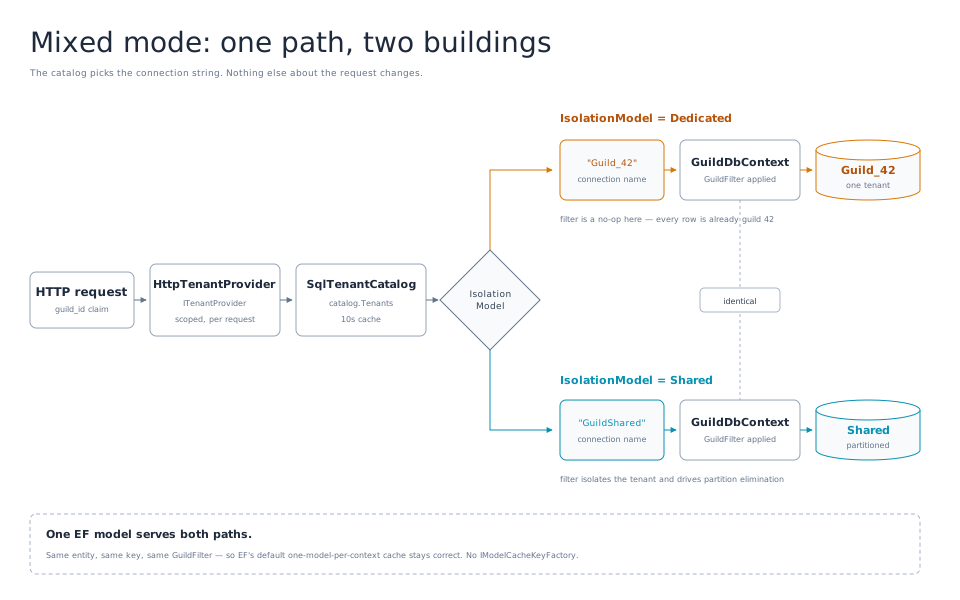
Against a dedicated database, adding WHERE GuildId = 42 is a no-op predicate over a table where every row has a value of 42. It costs us nothing performance-wise and lets our context support both dedicated and shared database designs. That keeps our model identical for every tenant, regardless of whether they are now on a shared database or a dedicated database. This also means you can keep to EF Core’s default one-model-per-context-type cache and we don’t need to use the IModelCacheKeyFactory from Part 2.
This will drive the move from a single mode system to a mixed-mode system. Some tenants will follow the rules of Part 1, and some will follow the rules of Part 3. And it will all work together seamlessly, simultaneously, and essentially permanently since it’s unlikely we’ll ever move all of them.
Getting The Rows Out
You’ve got the infrastructure in place. Now it’s time to get those data rows out of the shared database and into a dedicated database for the tenant. You’ve got three approaches, in increasing order of “you have a maintenance window”:
Option 1: Bulk copy with the filter you already have
public async Task<long> CopyTableAsync(
    string sourceConnection,
    string targetConnection,
    string table,
    int guildId,
    CancellationToken ct = default)
{
    await using var source = new SqlConnection(sourceConnection);
    await source.OpenAsync(ct);

    await using var cmd = new SqlCommand(
        $"SELECT * FROM dbo.{table} WHERE GuildId = @guildId;", source);
    cmd.Parameters.AddWithValue("@guildId", guildId);
    cmd.CommandTimeout = 0;

    await using var reader = await cmd.ExecuteReaderAsync(ct);

    using var bulk = new SqlBulkCopy(
        targetConnection,
        SqlBulkCopyOptions.KeepIdentity | SqlBulkCopyOptions.TableLock)
    {
        DestinationTableName = $"dbo.{table}",
        BatchSize = 10_000,
        BulkCopyTimeout = 0,
        EnableStreaming = true
    };

    // Match by name, not ordinal. Column order drift will ruin your week silently.
    foreach (var column in await GetColumnNamesAsync(sourceConnection, table, ct))
        bulk.ColumnMappings.Add(column, column);

    await bulk.WriteToServerAsync(reader, ct);
    return bulk.RowsCopied64;
}
KeepIdentity is the key here. Without this flag, SQL Server assigns fresh identity values and everything breaks apart as your foreign keys no longer point to the correct data rows, or none at all.
Option 2: Partition switch
Each guild has its own partition because you chose the partitioning column to match the tenant filter. Extracting them is a metadata operation, not a table scan.
-- Which drawer is guild 42 in?
SELECT $PARTITION.pfGuild(42) AS PartitionNumber;

-- Which filegroup is that partition on? The staging table must live there too.
SELECT ps.name AS PartitionScheme, dds.destination_id AS PartitionNumber, fg.name AS FileGroup
FROM sys.partition_schemes ps
JOIN sys.destination_data_spaces dds ON dds.partition_scheme_id = ps.data_space_id
JOIN sys.filegroups fg              ON fg.data_space_id = dds.data_space_id
WHERE ps.name = 'psGuild';

-- Staging table: identical structure, same filegroup, NOT partitioned.
CREATE TABLE dbo.Adventurers_Guild42
(
    Id      int           NOT NULL,
    GuildId int           NOT NULL,
    Name    nvarchar(200) NOT NULL,
    Class   nvarchar(100) NOT NULL,
    Level   int           NOT NULL,
    CONSTRAINT PK_Adventurers_Guild42 PRIMARY KEY CLUSTERED (Id, GuildId)
) ON [PRIMARY];

-- SWITCH will refuse without a constraint proving every row belongs in that partition.
ALTER TABLE dbo.Adventurers_Guild42
ADD CONSTRAINT CK_Adventurers_Guild42 CHECK (GuildId = 42);

-- Near-instant. Replace 4 with the partition number from above.
ALTER TABLE dbo.Adventurers SWITCH PARTITION 4 TO dbo.Adventurers_Guild42;
SWITCH only moves metadata within one database, so this gets the rows out of the table, but not out of the server. You still have to do a bulk copy to move them out to the new server, but now you’re only reading an isolated table that nobody else is querying, so the rows are already out of everyone’s way and you have no impact to the main table.
If the move goes wrong and you need to move them back, you can simply run SWITCH again:
ALTER TABLE dbo.Adventurers_Guild42 SWITCH TO dbo.Adventurers PARTITION 4;
Option 3: Backup & Restore, then Delete the rest
This is the brute force method. But it’s probably the best approach if the tenant you’re moving is the big one in the data. Do a backup of the full database, restore it as a new database, then delete all the records that aren’t tied to the tenant you’re moving.
One thing to be careful about here, and it’s easy to skate past: for the window between the restore and the last of those deletes, that new database contains every tenant’s data. If the reason you’re doing this migration in the first place is a contract or a regulation that says guild 42’s data must be physically separated, then a database that briefly holds everyone else’s rows and is destined to be handed to guild 42 is precisely the thing you just promised wouldn’t exist. Do the restore and the cleanup somewhere isolated, confirm the deletes, and only then point anything at it. The backup file itself deserves the same care.
The Gotchas
First, as I’ve already covered, you have to ensure that all of the existing identities migrate unaltered. If you don’t, every external reference breaks.
If you’re using EF Core migrations, as we are, remember to provision and migrate your new database first:
public async Task<string> ProvisionAsync(int guildId, CancellationToken ct = default)
{
    var connectionString = await _provisioner.CreateDatabaseAsync($"Guild_{guildId}", ct);

    var options = new DbContextOptionsBuilder<GuildDbContext>()
        .UseSqlServer(connectionString)
        .Options;

    await using var context = new GuildDbContext(
        options, new TenantInfo(guildId, IsolationModel.Dedicated, null, false));

    // Creates the tables AND populates __EFMigrationsHistory to the current version.
    // Skip this and use a raw CREATE script, and your next deploy tries to
    // re-run every migration from InitialCreate.
    await context.Database.MigrateAsync(ct);

    return connectionString;
}
You can’t copy data into tables that don’t exist yet.
If you’re using SQL to migrate the data, make sure you’re using IDENTITY_INSERT:
SET IDENTITY_INSERT dbo.Adventurers ON;
-- ... INSERT with an explicit Id column list (required while this is on) ...
SET IDENTITY_INSERT dbo.Adventurers OFF;
Only one table per session can have IDENTITY_INSERT turned on, so you have to remember to turn it on, copy data, turn it off for each table one at a time.
If you have any foreign keys (as you should), the order of table migrations matter. Parent tables first, then child tables. If you’d rather not figure out that matrix of relationships, you can turn constraints off, do the migrations, then turn them back on again:
-- Before the import
ALTER TABLE dbo.QuestLogs NOCHECK CONSTRAINT ALL;

-- ... import parents and children in any order ...

-- After. WITH CHECK is not optional.
ALTER TABLE dbo.QuestLogs WITH CHECK CHECK CONSTRAINT ALL;
The double CHECK CHECK is not a typo. The first is the option. The second is the keyword. If you skip it, the constraints come back untrusted. They’ll still enforce future writes, but the optimizer stops using them to simplify query plans — so some queries get a worse plan immediately, and nothing anywhere tells you why. Verify that your constraints are all trusted after the migration:
SELECT name, is_not_trusted
FROM sys.foreign_keys
WHERE is_not_trusted = 1;   -- should return nothing
If that returns anything at all, re-run the re-enable with both CHECKs before you go any further.
However you migrate the data, once it’s over you’ve got to reseed the identities so that as new records get added, they don’t collide with the rows you copied over.
-- After the import. Without this, the next new adventurer gets Id = 1
-- and collides with the row you just moved.
DECLARE @max int = (SELECT ISNULL(MAX(Id), 0) FROM dbo.Adventurers);
DBCC CHECKIDENT ('dbo.Adventurers', RESEED, @max);
This ensures that new IDENTITY keys on the table start with the next value, and not back at 1. This is the piece that a lot of people miss.
This is also a great opportunity to implement changes to the structure that would be beneficial. For instance, adding a rowversion field:
public class Adventurer : IBelongToGuild
{
    public int Id { get; set; }
    public int GuildId { get; set; }
    public string Name { get; set; } = string.Empty;
    public string Class { get; set; } = string.Empty;
    public int Level { get; set; }

    [Timestamp]
    public byte[] Version { get; set; } = default!;
}

// Capture the watermark BEFORE the bulk copy starts.
// MIN_ACTIVE_ROWVERSION, not @@DBTS: @@DBTS can hand you a value that an
// uncommitted transaction has already claimed, and you'll miss those rows.
await using var cmd = new SqlCommand("SELECT MIN_ACTIVE_ROWVERSION();", source);
var watermark = (byte[])(await cmd.ExecuteScalarAsync(ct))!;

// After the read-only flip, copy everything that changed since the watermark.
await using var delta = new SqlCommand("""
    SELECT * FROM dbo.Adventurers
    WHERE GuildId = @guildId AND Version >= @watermark;
    """, source);
delta.Parameters.AddWithValue("@guildId", guildId);
delta.Parameters.Add("@watermark", SqlDbType.Binary, 8).Value = watermark;
One important caveat before you lean on this too hard: rowversion doesn’t capture deletes. It only moves forward on insert and update. A row that guild 42 deleted between the bulk copy and the read-only flip is simply gone from the source and still sitting in the target, and no Version >= @watermark query will ever tell you about it. If your app soft-deletes, you’re fine. If it doesn’t, the row count comparison in the verification step is what catches it, which is one more reason not to treat verification as a formality.
The Cutover
Now that the data has been moved, it’s time for the cutover. A tenant scoped maintenance mode is the best approach overall. Guild 42 sees a “closed for renovations” notice while everyone else keeps drinking their mead. An EF Core SaveChangesInterceptor is the right place for it, rather than middleware. Middleware only sees HTTP requests, so anything writing outside the request pipeline — a background job, a queue consumer, a scheduled task — sails straight past it. An interceptor sits on SaveChanges itself, which every write has to go through:
public sealed class ReadOnlyTenantInterceptor : SaveChangesInterceptor
{
    public override InterceptionResult<int> SavingChanges(
        DbContextEventData eventData, InterceptionResult<int> result)
    {
        Guard(eventData);
        return result;
    }

    public override ValueTask<InterceptionResult<int>> SavingChangesAsync(
        DbContextEventData eventData,
        InterceptionResult<int> result,
        CancellationToken ct = default)
    {
        Guard(eventData);
        return ValueTask.FromResult(result);
    }

    private static void Guard(DbContextEventData eventData)
    {
        if (eventData.Context is GuildDbContext { Tenant.IsReadOnly: true } context)
            throw new TenantReadOnlyException(context.Tenant.GuildId);
    }
}
Make it a 503 response instead of a plain 500.
// Turn it into a 503 with a Retry-After rather than a 500.
app.UseExceptionHandler(handler => handler.Run(async ctx =>
{
    var error = ctx.Features.Get<IExceptionHandlerFeature>()?.Error;
    if (error is TenantReadOnlyException)
    {
        ctx.Response.StatusCode = StatusCodes.Status503ServiceUnavailable;
        ctx.Response.Headers.RetryAfter = "120";
        await ctx.Response.WriteAsJsonAsync(new
        {
            title  = "Closed for renovations",
            detail = "This guild is being moved to its own database. Reads are fine; try writing again shortly."
        });
    }
}));
Every other guild carries on completely unaffected.
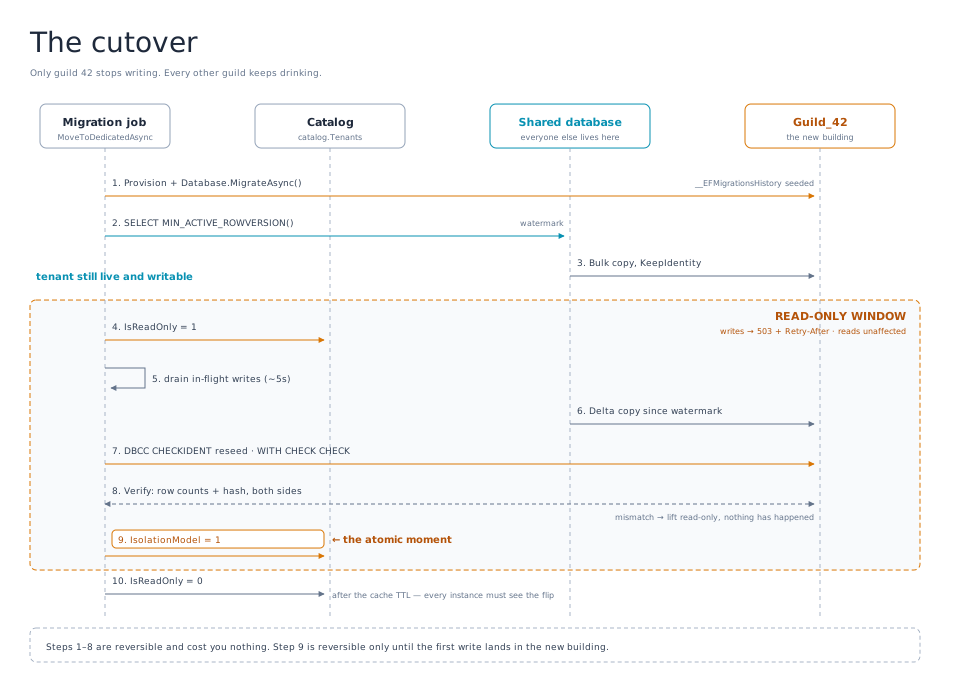
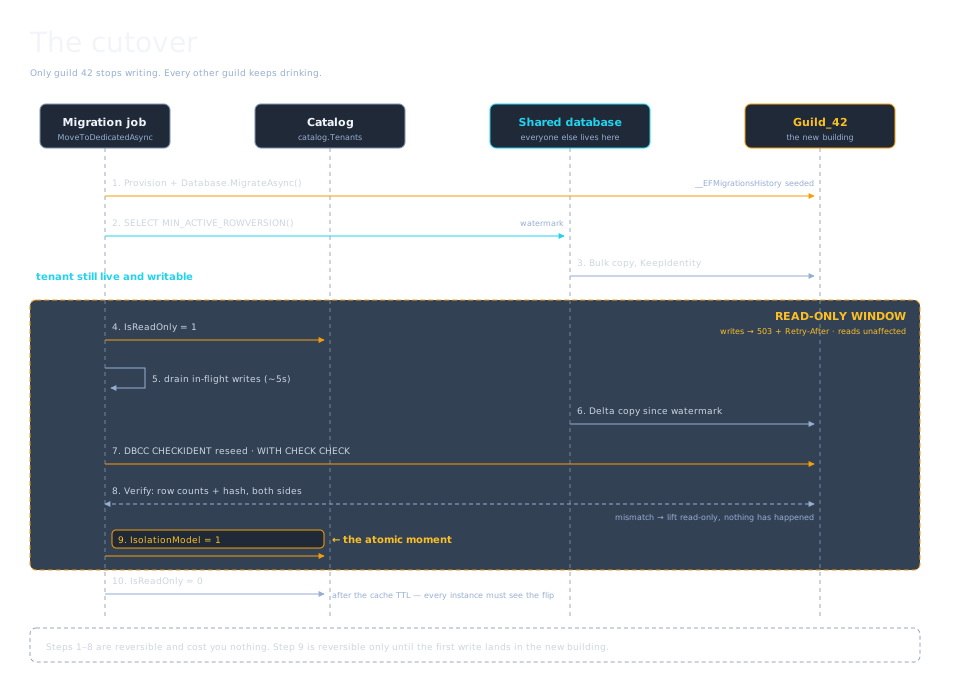
Here’s the whole sequence:
- Provision + migrate the new database
- Bulk import (tenant still live and writable — accept that you’ll do a delta)
- Flip guild 42 to read-only in the catalog; drain in-flight writes
- Copy the delta since step 2
- Verify (next section)
- Flip IsolationModel to Dedicated in the catalog — this is the atomic moment
- Wait out the catalog cache TTL so every app instance sees the flip
- Lift read-only
- Wait. Do not delete the source rows yet.
A dedicated function can be used to help you complete the migration.
public async Task MoveToDedicatedAsync(int guildId, CancellationToken ct = default)
{
    var tables = new[] { "Adventurers", "QuestLogs", "Inventories" };   // parents first

    // 1. Provision + migrate. Tenant is still fully live.
    var target = await ProvisionAsync(guildId, ct);
    _log.LogInformation("Guild {GuildId}: target database provisioned", guildId);

    // 2. Bulk copy while they keep working. Expect drift; that's what step 4 is for.
    var watermark = await GetWatermarkAsync(_shared, ct);
    foreach (var table in tables)
        await CopyTableAsync(_shared, target, table, guildId, ct);

    // 3. The window opens.
    await SetReadOnlyAsync(guildId, true, ct);
    await Task.Delay(TimeSpan.FromSeconds(5), ct);   // let in-flight requests drain

    // 4. Catch up on everything written since step 2.
    foreach (var table in tables)
        await CopyDeltaAsync(_shared, target, table, guildId, watermark, ct);

    // 5. Reseed identities and re-trust constraints.
    await FinalizeTargetAsync(target, tables, ct);

    // 6. Prove it before you commit to it.
    var report = await VerifyAsync(_shared, target, tables, guildId, ct);
    if (!report.Matches)
    {
        await SetReadOnlyAsync(guildId, false, ct);   // abort cleanly, nothing lost
        throw new MigrationVerificationException(report);
    }

    // 7. The atomic moment.
    await FlipToDedicatedAsync(guildId, connectionName: $"Guild_{guildId}", ct);

    // 8. Let the flip propagate. Invalidate() only clears the cache on THIS
    //    instance; every other one is still serving a cached TenantInfo that
    //    says "Shared" until its TTL expires.
    await Task.Delay(SqlTenantCatalog.CacheFor + TimeSpan.FromSeconds(2), ct);

    // 9. Reopen the doors.
    await SetReadOnlyAsync(guildId, false, ct);
    _log.LogInformation("Guild {GuildId}: now dedicated", guildId);
}
Note what step 6 buys you: If the verification fails, you flip read-only back off and nothing has happened. The tenant never left the shared database. The target database is garbage that can be tossed out. Figure out what went wrong and you’re ready to make another attempt later.
The code for the flip is also straightforward:
private async Task FlipToDedicatedAsync(int guildId, string connectionName, CancellationToken ct)
{
    await using var conn = new SqlConnection(_catalogConnection);
    await conn.OpenAsync(ct);

    await using var cmd = new SqlCommand("""
        UPDATE catalog.Tenants
        SET IsolationModel = 1,
            ConnectionName = @name
        WHERE GuildId = @guildId
          AND IsolationModel = 0;   -- refuse to flip a tenant someone already moved
        """, conn);
    cmd.Parameters.AddWithValue("@guildId", guildId);
    cmd.Parameters.AddWithValue("@name", connectionName);

    if (await cmd.ExecuteNonQueryAsync(ct) != 1)
        throw new InvalidOperationException(
            $"Guild {guildId} was not in the expected Shared state. Someone else is moving it.");

    _catalog.Invalidate(guildId);
}
The AND IsolationModel = 0 is your concurrency guard. Two operators running the runbook simultaneously is not a hypothetical.
And notice that _catalog.Invalidate(guildId) at the end only clears the cache on the instance that ran the job. Every other instance in your farm is still holding a cached TenantInfo that says Shared, and it will keep saying that until its ten seconds are up. Lift read-only the instant after the flip and those instances will happily accept writes and route them straight back into the shared database, into a tenant you just finished verifying and are about to purge. That’s why the wait is its own step. Ten seconds of extra read-only is cheap. Reconciling a handful of orphaned writes after the fact is not.
Prove It Before You Move On
That last step is critical. Don’t delete anything until you have proven the new database is working. Collect row counts per table, CHECKSUM_AGG, or a hash of each table. Spot-check the tenant’s own reports against both stores. Leave the source rows in place, filter-excluded, for a defined bake period. Rollback during that window is one catalog UPDATE. After it, it’s a restore from backup. So be absolutely certain before you commit fully.
-- Run against both databases and compare. Cheap, and catches the failures
-- that actually happen (missing rows, half-copied batches).
SELECT
    COUNT_BIG(*)                        AS RowCount,
    CHECKSUM_AGG(CHECKSUM(Id, Name, Class, Level)) AS Fingerprint,
    MAX(Id)                             AS MaxId
FROM dbo.Adventurers
WHERE GuildId = 42;    -- omit the WHERE against the dedicated database
CHECKSUM_AGG is fast, but order-insensitive and prone to collisions. For a critical tenant you probably want to spend the extra time to do a full hash:
SELECT CONVERT(varchar(64),
    HASHBYTES('SHA2_256',
        (SELECT Id, Name, Class, Level
         FROM dbo.Adventurers
         WHERE GuildId = 42
         ORDER BY Id
         FOR JSON PATH)), 2) AS Fingerprint;
Be aware of what that costs, though. FOR JSON PATH builds the entire table into a single string in memory before HASHBYTES ever sees it. For a demo guild it’s instant. For a tenant with millions of adventurers it’s a great way to make your verification step the slowest part of the whole migration, and you’re running it inside the read-only window. If the table is big, hash it in ID ranges and compare batch by batch, or skip the full hash on that table and lean on row counts plus CHECKSUM_AGG. The point is to catch a half-copied batch, and a per-range hash does that just as well while letting you resume instead of starting over.
Or to automate it as part of your C# function:
public sealed record TableReport(string Table, long SourceRows, long TargetRows,
                                 string SourceHash, string TargetHash)
{
    public bool Matches => SourceRows == TargetRows
                        && string.Equals(SourceHash, TargetHash, StringComparison.Ordinal);
}

public sealed record VerificationReport(IReadOnlyList<TableReport> Tables)
{
    public bool Matches => Tables.All(t => t.Matches);

    public override string ToString() => string.Join(Environment.NewLine,
        Tables.Select(t => $"{(t.Matches ? "OK  " : "FAIL")} {t.Table,-16} " +
                           $"{t.SourceRows} -> {t.TargetRows}"));
}
Make sure you log the output either way. If someone wants to prove down the road that everything was successful, you’ll want that artifact, not your memory.
I should highlight here the one thing that makes rollback really hard: writes that occur in the new database after cutover are extremely difficult to move back to the shared database if you do need to do a rollback. So do everything you absolutely can to verify everything is good as part of the cutover.
Time To Actually Delete
After that baking period, and you’re sure everything is good, it’s time to clean up the remnants. This is the piece that tends to be forgotten and never scheduled, but it’s important. If you had implemented partitioned tables, this piece is easy. It’s a simple SWITCH and TRUNCATE.
ALTER TABLE dbo.Adventurers SWITCH PARTITION 4 TO dbo.Adventurers_Guild42;
TRUNCATE TABLE dbo.Adventurers_Guild42;
DROP TABLE dbo.Adventurers_Guild42;

-- Reclaim the now-empty boundary.
ALTER PARTITION FUNCTION pfGuild() MERGE RANGE (42);
If you didn’t partition, it’s a bit more effort. Set up your DELETE in batches so you don’t tie up tables or force your transaction log to grow exponentially:
SET NOCOUNT ON;
DECLARE @batch int = 5000, @deleted int = 1;

WHILE @deleted > 0
BEGIN
    DELETE TOP (@batch) FROM dbo.Adventurers WHERE GuildId = 42;
    SET @deleted = @@ROWCOUNT;

    WAITFOR DELAY '00:00:00.100';   -- let the log back up and other tenants breathe
END
This is the same process you’ll need for tenant off-boarding so you might as well take the time to set this all up as a dedicated function. Call it PurgeTenantAsync and make it part of your admin toolset in your app. This also makes it easy to support things like GDPR delete requests, something you’ll have to do anyway to maintain compliance with the law.
Going The Other Way
It turns out Guild 42’s contract lapsed and they’re back to a hobby group. So how do you consolidate a dedicated tenant back into the shared database? It’s just the same steps, just in reverse. Well, of course it’s not that simple. There’s one problem that doesn’t exist in the other direction: their IDs will now collide with the shared table’s. You either remap keys and rewrite every FK, or you just have to accept new IDs and keep a translation table.
CREATE TABLE #IdMap (OldId int PRIMARY KEY, NewId int NOT NULL);

MERGE INTO dbo.Adventurers AS tgt
USING Guild_42.dbo.Adventurers AS src
    ON 1 = 0                      -- never matches, so every row is an INSERT
WHEN NOT MATCHED THEN
    INSERT (GuildId, Name, Class, Level)
    VALUES (42, src.Name, src.Class, src.Level)
OUTPUT inserted.Id, src.Id INTO #IdMap (NewId, OldId);
Yes, that’s a MERGE with an ON clause that can never be true, and no, it isn’t a typo. You have to capture both the new ID and the old one in the same breath, and a plain INSERT ... SELECT can’t do it: its OUTPUT clause only sees inserted.*, so the moment you reference src.Id you get “The multi-part identifier src.Id could not be bound.” MERGE is the one statement whose OUTPUT can see the source table as well as the inserted rows, so ON 1 = 0 is the sanctioned trick for forcing every row down the WHEN NOT MATCHED path just to get at it.
Then rewrite every child reference using that map:
INSERT INTO dbo.QuestLogs (GuildId, AdventurerId, Title, CompletedOn)
SELECT 42, map.NewId, q.Title, q.CompletedOn
FROM Guild_42.dbo.QuestLogs AS q
JOIN #IdMap AS map ON map.OldId = q.AdventurerId;
Be sure to keep that map permanently. Remember that anything outside your database, such as a customer’s saved URL, a partner integration, or an invoice line, could still hold the old ID from the dedicated database:
CREATE TABLE catalog.IdTranslations
(
    GuildId    int          NOT NULL,
    EntityName sysname      NOT NULL,
    OldId      int          NOT NULL,
    NewId      int          NOT NULL,
    MovedOn    datetime2(0) NOT NULL CONSTRAINT DF_IdTranslations_MovedOn DEFAULT SYSUTCDATETIME(),
    CONSTRAINT PK_IdTranslations PRIMARY KEY (GuildId, EntityName, OldId)
);
Migration is easier going from shared to dedicated. So the default advice is: Start at Part 1 and only graduate when forced.
The Runbook
Make it all repeatable. You want to be able to do things like:
# Dry run: provision, copy, verify. Never flips the catalog, never takes the tenant read-only.
guildctl move 42 --to dedicated --dry-run

# Real thing. --bake keeps source rows for the rollback window.
guildctl move 42 --to dedicated --bake 7d

# Rollback during the bake window: one catalog update, plus the delta
# of anything written to the new database since cutover.
guildctl rollback 42 --replay-since 2026-09-14T18:22:00Z

# After the bake window
guildctl purge 42 --from shared --confirm
Let’s wrap it up with a checklist that summarizes it all:
| Step | Reversible? | Tenant impact | Blast radius |
|---|---|---|---|
| Provision + migrate target | Yes — drop the database | None | None |
| Bulk copy | Yes — truncate target | None | Read load on shared DB |
| Read-only on | Yes — flip it back | Writes rejected, reads fine | One tenant |
| Delta copy | Yes | Writes rejected | One tenant |
| Verify | Yes | Writes rejected | None |
| Catalog flip | Yes, until the first new write | Momentary | One tenant |
| Read-only off | — | Back to normal | One tenant |
| Purge source rows | No | None | Shared DB log growth |
Conclusion
Back in Part 2 I told you never to hand-roll anything when a quality library already exists, and then pointed at Finbuckle.MultiTenant. Fair question, then: what is all this?
The answer is that libraries like Finbuckle are very good at the part that repeats — resolving a tenant, storing the strategy, wiring the right store into the right context on every request. If you’re building mixed-mode support from scratch, use it. What no library ships is your move: your tables, your foreign keys, your identity columns, your tolerance for a read-only window, your rollback appetite. The migration is a one-time operation against a specific schema on a specific afternoon, which is exactly the kind of thing that never generalizes into a package. So let the library own the seam, and write the movers yourself.
Whether it be a guild that has gotten too big, or a kingdom that demands that a guild operates out of their territory instead of yours, migrating a tenant from a shared hall to a dedicated hall of their own, it’s a straightforward process to implement, as long as you’ve planned adequately for that eventuality.
And even now that Guild 42 has its own hall, some things will never change: the barkeep still can’t find anything, and your players still can’t agree on marching order.