
Thursday, August 20, 2026 | 7 minutes
Multi-Tenant .NET, Part 3: Separate Buildings (Database per Tenant)
Part of the series: Multi-Tenant .NET
- Multi-Tenant .NET: Shared Database With PartitionsPart 1 of 3. Building a shared-database multi-tenant app in .NET with EF Core global query filters, then using SQL Server table partitioning so the database physically keeps each tenant's data in its own drawer.
- Multi-Tenant .NET: Shared Database With Schema SeparationPart 2 of 3. Moving each tenant into its own SQL Server schema — which lets us delete the query filter, the TenantId column, and the SaveChanges stamp from Part 1, in exchange for exactly one new thing: a schema-aware model cache key.
- Multi-Tenant .NET, Part 3: Separate Buildings (Database per Tenant) (you are here)Part 3 of 3. Giving every tenant its own database - the strongest isolation there is. It deletes even more code than Part 2 (including the model cache key), and replaces it with a connection-string swap, a catalog database, and the joy of migrating N databases on every deploy.
- Multi-Tenant .NET, Part 4: Moving DayPart 4 of 3. Surprise! It's a bonus post for the series. What happens when you need to move to a new approach?
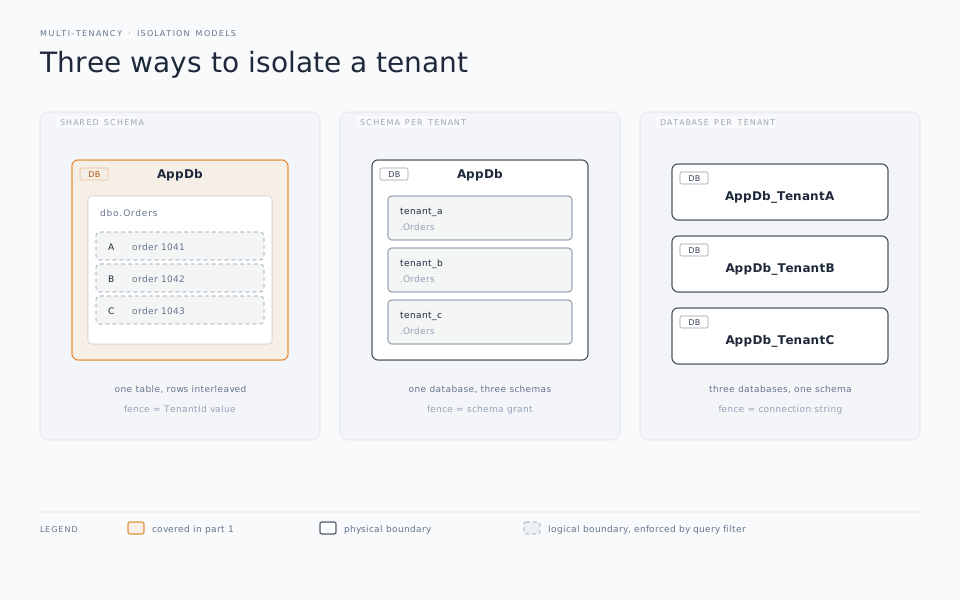
We started with every guild crammed into one shared ledger (Part 1). Then we gave each guild its own room in the same building (Part 2). Now we’re going all the way: every guild gets its own building. A separate database, a separate connection string, zero shared storage.
This is the strongest isolation you can buy. Guild 42’s data doesn’t just live in a different table or schema than guild 43’s. It lives in a different database that guild 43’s code never even opens a connection to. Noisy-neighbor problems vanish. You can back up, restore, scale, or encrypt one tenant without touching another. When a regulator asks “can you prove tenant data is physically separated,” the answer is finally an easy yes.
And here’s the delightful bit: this is the simplest the C# gets in the whole series. We’re about to delete nearly everything.
What you get to delete (yes, even more)
Everything that existed to slice a shared store into per-tenant pieces has nothing left to do:
- The query filter - already gone since Part 2, still gone. A database holds one tenant; there’s nothing to filter.
- The
SaveChangesstamp - gone. NoTenantIdto stamp. - The
TenantId/GuildIdcolumn - gone. The database is the tenant identifier. - The partitioning (Part 1) - gone. One tenant per database; nothing to partition for isolation.
- The schema-aware model cache key (Part 2) - gone, and this is the interesting one. In Part 2 we needed a per-schema model because the schema was baked into
OnModelCreating. Here, every tenant’s database has the identical schema - the model shape is the same everywhere; only the connection string differs. EF’s default one-model-per-context-type caching is exactly what we want. Delete theIModelCacheKeyFactoryand theReplaceServicecall with it.
Which means the context goes back to being completely boring:
public class GuildDbContext : DbContext
{
    public GuildDbContext(DbContextOptions<GuildDbContext> options)
        : base(options) { }

    public DbSet<Adventurer> Adventurers => Set<Adventurer>();

    protected override void OnModelCreating(ModelBuilder modelBuilder)
        => modelBuilder.Entity<Adventurer>();
}
No tenant provider in the constructor. No schema. No filter. If you handed this file to someone with no context, they’d never guess it was multi-tenant at all. All the tenant-awareness has moved out of the model and into the connection.
The one thing that changes: which building you walk into
The entire per-tenant decision now collapses to a single question asked once per request: which connection string? That gets answered from a small catalog (or “master”) database that maps each tenant to its connection string and provisioning metadata.
public interface ITenantConnectionResolver
{
    string GetConnectionString();   // looks up the current tenant in the catalog
}
Wire it up so the DbContext is configured per request from whatever the current tenant resolves to:
builder.Services.AddHttpContextAccessor();
builder.Services.AddScoped<ITenantProvider, HttpTenantProvider>();
builder.Services.AddScoped<ITenantConnectionResolver, CatalogConnectionResolver>();

builder.Services.AddDbContext<GuildDbContext>((sp, options) =>
{
    var resolver = sp.GetRequiredService<ITenantConnectionResolver>();
    options.UseSqlServer(resolver.GetConnectionString());
});
The Scoped lifetime matters for the same reason it did in Part 1: the connection string gets re-resolved per request. So a user switching tenants (or an admin impersonating one) gets a context pointed at the right building every time. If your app lets the tenant change within a scope, reach for a DbContextFactory with a transient lifetime instead. The EF Core docs have a good rundown of which lifetime fits which scenario.
That’s the whole runtime story. Resolve a connection string, hand it to EF, and it’s done. The ITenantProvider from Part 1 still identifies the tenant; it just feeds the resolver now instead of a filter.
Migrations: the same script, run N times
Here’s the tax you pay for all that isolation. In Part 1 you migrated once. In Part 2, once per schema. Here, once per database. That could be a lot of them.
Onboarding a new guild means creating its database and bringing it up to the current schema:
public async Task OnboardGuildAsync(int guildId)
{
    // Provision the database (CREATE DATABASE, or a cloud API call),
    // then record its connection string in the catalog.
    var connectionString = await _catalog.ProvisionDatabaseAsync(guildId);

    var options = new DbContextOptionsBuilder<GuildDbContext>()
        .UseSqlServer(connectionString)
        .Options;

    await using var context = new GuildDbContext(options);
    await context.Database.MigrateAsync();   // same migrations as everybody else
}
And on every deploy that ships a schema change, you have to deploy that migration across every tenant database:
public async Task MigrateAllTenantsAsync()
{
    foreach (var connectionString in await _catalog.GetAllConnectionStringsAsync())
    {
        var options = new DbContextOptionsBuilder<GuildDbContext>()
            .UseSqlServer(connectionString)
            .Options;

        await using var context = new GuildDbContext(options);
        await context.Database.MigrateAsync();
    }
}
That loop appears simple, but it isn’t. Think hard about what happens when tenant #57 out of 300 fails to migrate: do you stop, or carry on and report? Are your migrations idempotent enough to re-run the ones that already succeeded? For a handful of tenants a loop on startup is fine; past that you’ll want a real orchestrated job with logging, retries, and the ability to resume. This is a genuine operational surface, not an afterthought.
One tooling gotcha: the design-time factory
There’s a subtle problem the moment you remove the tenant provider from the constructor. When you run dotnet ef migrations add, the tooling tries to build a GuildDbContext - but there’s no real tenant, no HTTP request, and no connection string to hand it. EF can’t construct the context and the command fails.
The fix is an IDesignTimeDbContextFactory, which the tooling uses only at design time, with a throwaway connection string that just needs to point at a database with the right shape:
public class GuildDbContextDesignFactory : IDesignTimeDbContextFactory<GuildDbContext>
{
    public GuildDbContext CreateDesignTimeDbContext(string[] args)
    {
        var options = new DbContextOptionsBuilder<GuildDbContext>()
            .UseSqlServer("Server=.;Database=Guild_Design;Trusted_Connection=True;TrustServerCertificate=True")
            .Options;

        return new GuildDbContext(options);
    }
}
That database never serves a real tenant; it exists so migrations add and migrations script have something to reason about. Your actual tenant databases all get the resulting migration applied at runtime through the loop above.
The bills that come due
Database-per-tenant is the isolation everyone wants until they price it out:
- Connection pools fragment. Each distinct connection string gets its own ADO.NET pool. Ten tenants, ten pools; five hundred tenants, a pooling problem. On Azure SQL, elastic pools help you share compute across many databases without a pool-per-tenant cost explosion - worth designing for early.
- Cross-tenant reporting gets hard. “Total adventurers across all guilds” was a
GROUP BYin Part 1. Now it’s a fan-out across hundreds of databases, or a separate reporting pipeline that consolidates them. If analytics across tenants is core to your product, weigh this heavily. - Per-database overhead adds up. Every database has baseline cost - storage, compute floor, backup, monitoring. Multiply by tenant count.
You’re trading money and operational complexity for isolation you can point at. For some businesses, such as regulated data, enterprise customers who contractually demand separation, and wildly uneven tenant sizes, that trade is obviously correct. For a freemium app with fifty thousand hobbyist tenants, it would be madness. Which is really the theme of this whole series.
The whole series, on one page
Same little guild app, three ways to keep the tenants apart. Here’s what actually changes between them:
| Part 1 - Shared DB | Part 2 - Schema per tenant | Part 3 - Database per tenant | |
|---|---|---|---|
| Isolation boundary | WHERE GuildId filter | Schema | Whole database |
| Isolation strength | Logical (weakest) | Structural (medium) | Physical (strongest) |
| Query filter | Required | Dropped | Dropped |
TenantId column | Required | Optional | Dropped |
SaveChanges stamp | Required | Dropped | Dropped |
| Model cache key | Not needed | Required | Not needed |
| Connection strings | One | One | One per tenant |
| Migrations run | Once | Per schema | Per database |
| Back up / scale one tenant | No | Partly | Yes |
| Cross-tenant reporting | Easy | Moderate | Hard |
| Cost at many tenants | Lowest | Low–moderate | Highest |
| Good fit when… | Lots of small tenants, cost-sensitive | Moderate tenant count, want real isolation without per-DB overhead | Few large/regulated tenants who demand separation |
Notice how the code and the ops trade places as you move right: Part 1 is heavy on application code (filters, stamps, partition setup) and trivial to operate; Part 3 is almost no application code but a real operational program to run. Part 2 sits in the middle and, fittingly, is the only one that needs that oddball model cache key.
There’s no winner here. The answer, as always is: it depends. Pick the design that matches your tenant count, your isolation requirements, and how much operational weight you can carry. Most teams I’ve seen start at Part 1 for speed, and only graduate rightward when a specific customer, regulation, or scaling wall forces the question. Building the app so the tenant decision lives behind one seam - ITenantProvider and its friends - is what makes that graduation a refactor instead of a rewrite.
And with that, the guild hall saga is complete: one ledger, then private rooms, then separate buildings. My players, meanwhile, still can’t agree on a marching order. Some isolation problems are harder than others.